
Inspiring
December 31, 2020
Answered

RoboHelp 2019 - Limiting the width of a topic

  • December 31, 2020
  • 4 replies
  • 487 views

I'm working with RoboHelp 2019 (2019.0.14) - not the Classic version. I'm using Responsive HTML5 Output (Azure Blue). When I stretch the screen across, the text stretches all the way across. Our UX expert asked that the text not stretch all the way across, but rather we have a maximum width defined. I could not figure out how to do this (I tried formatting the Master Page, but wasn't successful). Any ideas?
    This topic has been closed for replies.
    Correct answer Peter Grainge

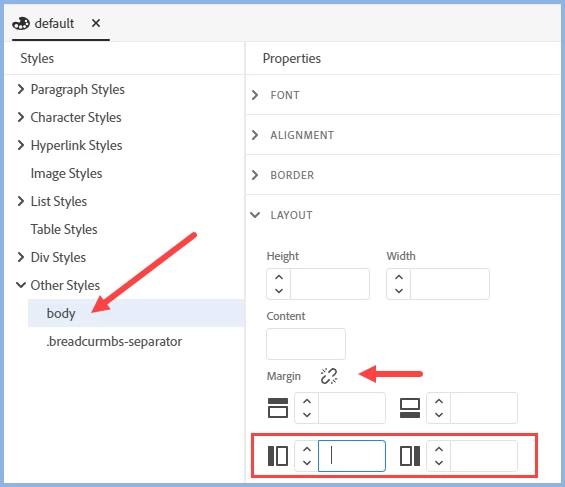
    BR is the line break tag, not the body tag. Try this.


    Set that in the topic CSS and you should be OK. I am assuming your master page uses the same CSS as your topics and you don't override it in your outputs.

    ________________________________________________________
    See www.grainge.org for free Authoring and RoboHelp Information

    4 replies

    Peter Grainge
    Community Expert
    Peter GraingeCommunity ExpertCorrect answer
    Community Expert
    January 3, 2021

    BR is the line break tag, not the body tag. Try this.


    Set that in the topic CSS and you should be OK. I am assuming your master page uses the same CSS as your topics and you don't override it in your outputs.

    ________________________________________________________
    See www.grainge.org for free Authoring and RoboHelp Information

    Use the menu (bottom right) to mark the Best Answer or Highlight particularly useful replies. Found the answer elsewhere? Share it here.
    Inspiring
    January 3, 2021

    Perfect. Thanks. Worked like a charm!

    Peter Grainge
    Community Expert
    Community Expert
    January 1, 2021

    Working now?

    ________________________________________________________
    See www.grainge.org for free Authoring and RoboHelp Information

    Use the menu (bottom right) to mark the Best Answer or Highlight particularly useful replies. Found the answer elsewhere? Share it here.
    Inspiring
    January 3, 2021

    I still wasn't able to get this to work. This is what I set in the CSS:

    The text itself is marked with a style called "BodyText".


    Peter Grainge
    Community Expert
    Community Expert
    December 31, 2020

    You need to edit the body tag of the CSS applied to the topics.

    ________________________________________________________
    See www.grainge.org for free Authoring and RoboHelp Information

    Use the menu (bottom right) to mark the Best Answer or Highlight particularly useful replies. Found the answer elsewhere? Share it here.
    Peter Grainge
    Community Expert
    Community Expert
    December 31, 2020

    You need to go into the CSS and create left and right margins.

    ________________________________________________________
    See www.grainge.org for free Authoring and RoboHelp Information

    Use the menu (bottom right) to mark the Best Answer or Highlight particularly useful replies. Found the answer elsewhere? Share it here.
    Inspiring
    December 31, 2020

    Do you mean in the Master Page? Where should the cursor be when I make the changes. When I tried it, the tag was "br" and I changed the margins marked in red in the attached image (but it didn't work). Is that what you mean?