

chelluvsGod
Inspiring
September 18, 2020
Answered

RoboHelp 2019 New UI - Inserting Images for bulleted item

  • September 18, 2020
  • 4 replies
  • 499 views

Since I can no longer control numbered steps, I am finding it very difficult to insert images.

I have my numbering set to Multilevel List Styles. 

This is what I have in my guide.

I insert the image at step 2 and float it to the right. 
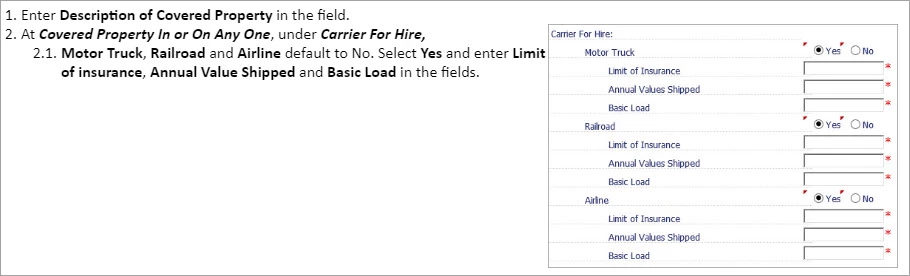
 

Conceivably, the wording would be more centered with the image. I have played around with the properties and I cannot figure out how to make it look right. 


When I put the next line of text in, it should be number 3, but the numbering starts at 1 again. In past versions of RoboHelp I could control the number value. 
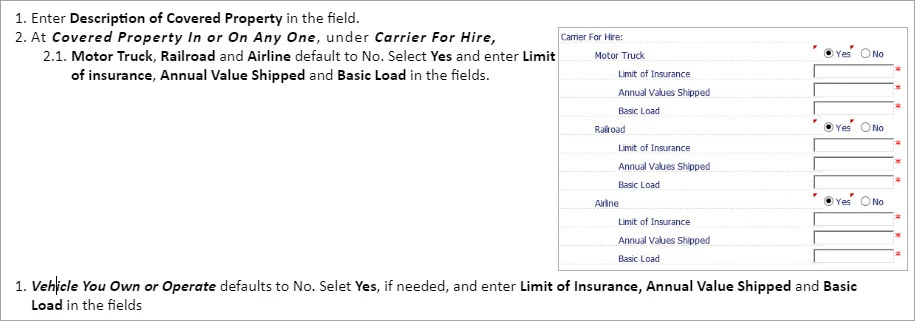
Is there something I'm missing?

    This topic has been closed for replies.
    Correct answer Jeff_Coatsworth

    Not sure what you're doing with that image - I would expect (if I was authoring this) to hit Shift-Enter after 2.1. and then insert the image, then do another Shift-Enter and then a hard return to get 3. appearing.

    4 replies

    Peter Grainge
    Community Expert
    Community Expert
    September 19, 2020

    What Jeff has described is likely the method many of use to get an image inline with the list item above.


    Styles for images to apply a fixed top, bottom, left or right margin will work in both frameless and responsive. Effectively they are just another paragraph. You can also use Jeff's suggestion to add text inline without the number or bullet point. There's less control over the space before and after but in most cases it works out.


    I tend to use Shift Enter and see what it looks like, then use other styles when I am not happy with the result. Your users won't know or care how you have achieved the end result.


    Use menu (bottom right) to mark as Best Answer or to Highlight particularly useful replies. Found the answer elsewhere? Share it here.
    Jeff_Coatsworth
    Community Expert
    Community Expert
    September 18, 2020

    Even then, you have to think what's going to happen at various device resolutions if you're create responsive HTML5 output.

    chelluvsGod
    Inspiring
    September 18, 2020

    I ended up doing exactly what you said. I was going to try to make my user guides more interesting by floating screen shots in places but obviously it's not going to look right with bulleted lines. I guess it only works correctly with a paragraph. 

    Jeff_Coatsworth
    Community Expert
    Jeff_CoatsworthCommunity ExpertCorrect answer
    Community Expert
    September 18, 2020

    Not sure what you're doing with that image - I would expect (if I was authoring this) to hit Shift-Enter after 2.1. and then insert the image, then do another Shift-Enter and then a hard return to get 3. appearing.

    Sleant
    Inspiring
    July 2, 2024

    This is pretty much "gold"! Thank you so much, Jeff.