

chelluvsGod
Inspiring
September 16, 2020
Question

RoboHelp 2019 Not allowing upgraded project topics to be updated.

  • September 16, 2020
  • 14 replies
  • 284 views

I just "Upgraded Project RoboHelp Classic project" 

I went to the first topic I needed to update and the some of the bulleted items have an extra bullet.
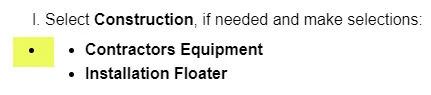
 

I removed the extra bullet but it removed them all. Now when I try to reinsert the bullets and tab to place the words where I want them, the tab key does not work. I tried using Properties/Alignment/Increase Indent but that does nothing. I went to the bottom of the topic to see if the tab key or Increase/Decrease Incdent works, but nothing happens. 
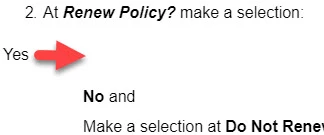
 

I am afraid to do anything else for fear of really messing up the guide I am working on. I've never experience issues when upgrading a project to a new version in the past. 

I really hope I don't have to recreate this project from scratch as it very large. 

Thank you.

    This topic has been closed for replies.

    14 replies

    chelluvsGod
    Inspiring
    September 16, 2020

    Thank you so much. 

    Not sure where you are but I'm in Ohio. 

    Peter Grainge
    Community Expert
    Community Expert
    September 16, 2020

    I think I see the problem and will give some suggestions in the morning. Late here.


    Use the menu (bottom right) to mark the Best Answer or Highlight particularly useful replies. Found the answer elsewhere? Share it here.
    chelluvsGod
    Inspiring
    September 16, 2020

    Hi Peter.

    Yes, this is version 2019 New UI. 

    This is my finding. 

    I am seeing the bulleting issue throughout my project, not just one one topic.

    Some of the lists are set as None, while others are set as p (paragraph). 


    Here is the first one that is set to None along with source code:


    Here is a sample of a list that is set to paragraph:


    I also zipped a copy of the project. 


    Peter Grainge
    Community Expert
    Community Expert
    September 16, 2020

    This is 2019 New UI, not 2019 Classic, correct?


    First of all it is a CSS3 / HMTL5 issue so you will not be having to recreate the project.


    Create a zipped copy of your project now so that anything that goes wrong is not catastrophic.


    Open a topic that has a list and look in two places.

    1. In Properties > Styles select All and then click in a list. See what style is highlighted on the right. That should be what needs fixing.
    2. Also select a whole list item and then switch to source view. Copy what you find there and paste it into a reply here.


    That should let us get some idea of what is going on. 


    Use the menu (bottom right) to mark the Best Answer or Highlight particularly useful replies. Found the answer elsewhere? Share it here.