


Inspiring
Oct 31, 2020 7:25 PM UTC
Question

RoboHelp 2019: Not seeing the output presets menu for Microsoft HTML Help

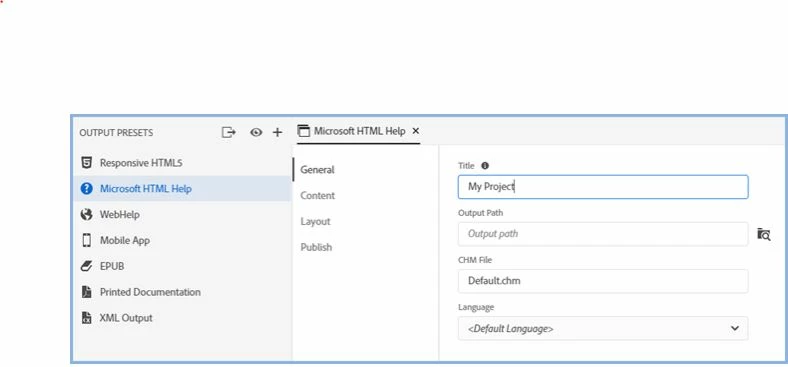
When I click on Microsoft HTML Help in the Output Presets menu, I don't see the menu that shows the General, Content, Layout, and Publish options, as shown below. I'm trying to see where my .chm file is located. What am I missing?
    This topic is closed to new replies. Start a new post to keep the conversation going.

    5 replies

    Peter Grainge
    Community Expert
    Community Expert
    Oct 31, 2020 9:34 PM UTC

    No worries. Take a look at the RoboHelp Reimagined sample project. Lots of How To information there.


    Translate
    Use the menu (bottom right) to mark the Best Answer or Highlight particularly useful replies. Found the answer elsewhere? Share it here.
    Peter Grainge
    Community Expert
    Community Expert
    Oct 31, 2020 8:47 PM UTC

    Click the Edit option or double click Microsoft HTML Help.


    Translate
    Use the menu (bottom right) to mark the Best Answer or Highlight particularly useful replies. Found the answer elsewhere? Share it here.
    Inspiring
    Oct 31, 2020 8:56 PM UTC

    Ahhhh! We tried every other type of click except that one. Now where do I find the "embarrassed" emoji here??


    Thank you for answering that newbie question!

    Translate
    Peter Grainge
    Community Expert
    Community Expert
    Oct 31, 2020 7:36 PM UTC

    What are you seeing? 


    Translate
    Use the menu (bottom right) to mark the Best Answer or Highlight particularly useful replies. Found the answer elsewhere? Share it here.
    Inspiring
    Oct 31, 2020 8:32 PM UTC

    Hi Peter,

    BTW, we're on RoboHelp version 2019.0.14.

    Here's what we see:


    Translate