

chelluvsGod
Inspiring
September 15, 2020
Answered

RoboHelp 2019 - Trainer Screen is Different Than My Own

  • September 15, 2020
  • 1 reply
  • 212 views

I am taking an online course to get familiar with RoboHelp 2019 which was just installed on my computer. It is a video course. I noticed that my screen is different than the trainers screen and I don't understand why.

The trainer described the 3 main areas of the screen, Author, Output and Review. 
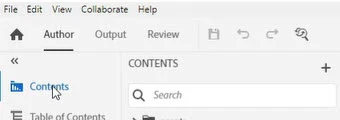
 

When Iook at my screen, I do not see the Review area. Also, on the trainer's screen, there is a Search field under Contents. I do not see that on my screen either. 
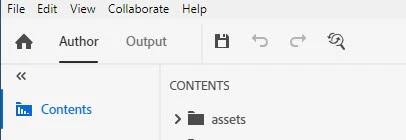
What would cause me not to see these items on my screen?

Thank you,

Michele


    This topic has been closed for replies.
    Correct answer Peter Grainge

    Review is something that was introduced in RoboHelp 2020. The first screenshot is from 2020, yours in 2019.


    1 reply

    Peter Grainge
    Community Expert
    Peter GraingeCommunity ExpertCorrect answer
    Community Expert
    September 15, 2020

    Review is something that was introduced in RoboHelp 2020. The first screenshot is from 2020, yours in 2019.


    Use the menu (bottom right) to mark the Best Answer or Highlight particularly useful replies. Found the answer elsewhere? Share it here.