



carlyr95100615
Participant
Apr 30, 2019 3:55 PM UTC
Question

Robohelp 2019 (Update 6): Git/SSH error "Permission denied (publickey)."

I have an empty remote repository set up on Github (with a public RSA key associated with my account), a locally-saved project (just upgraded, ~1200 topics), a Connection Profile with the matching private key, and none of the problems listed here. Unless Rh secretly uses sudo?

So, why does Robohelp throw this error and become unresponsive whenever I try to Add Project to the profile/remote repo? (I've followed these instructions, though given it's not working yet I could have followed them incorrectly!)
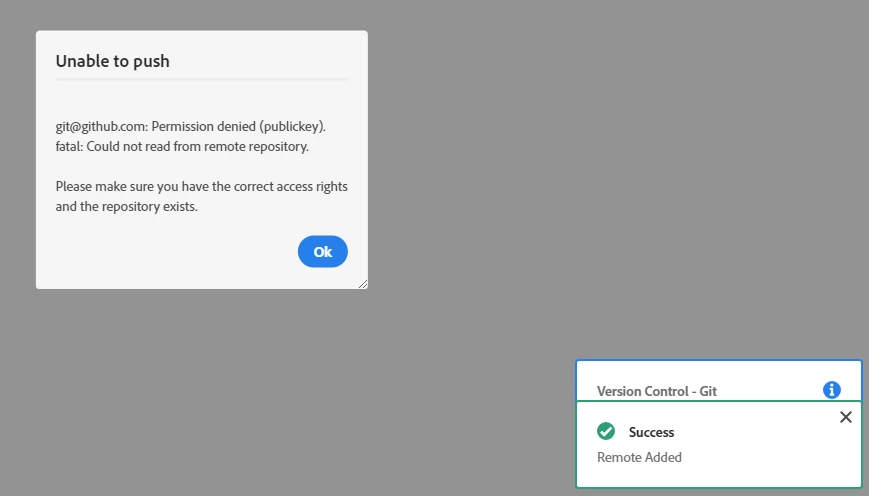
This topic is closed to new replies. Start a new post to keep the conversation going.

4 replies

carlyr95100615
Participant
May 7, 2019 4:23 PM UTC

Hi Dhruv,

1. Yes, and it's above the path to the native Windows SSH client.

2. Yes, it has connected successfully.

3. I thought so! I created the repo myself using my Github account and the browser interface. The SSH key is currently associated with my account, rather than set as a deploy key for the repo itself, but both ways have resulted in similar errors. (I assumed I didn't need to add myself as a collaborator.) Should I be using one of those SSH key set-ups in particular, or should either way work?

Many thanks!

Translate
Adobe Employee
May 8, 2019 12:25 PM UTC

Hello

Is the ssh key that you have added present in the '~/.ssh' directory? Here '~' represents the home directory of the current logged in user with which RoboHelp is being run. The same key (private) must be present in the '~/.ssh' directory of the current logged in user and also added to the remote repository(public). Please ensure this is the case

Thanks

Dhruv

Translate
carlyr95100615
Participant
May 31, 2019 3:10 PM UTC

Hi Dhruv,

Apologies for the delay, haven't looked at the repo in a few weeks.

I get the same behaviour with SSH keys (all in the ~/.ssh directory) set as repo deploy keys as I do when the key is attached to my Github account.

(Add Project often crashes Rh, but when I restart, the project appears to have been added. Whether it crashes when adding the project or not, when I Commit the program hangs/crashes while displaying the "Version Control - Git, Getting latest changes" message. When I Push, I get the error message above and the program also hangs/crashes.)

Using Git Bash, "$ git remote -v" in my Local Path returns "origin git@github:MyUsername/my-repo-name.git (fetch)" and "... (push)". Which implies that the remote/local connection (with permission to push to the remote) has been set up correctly, but there's a problem doing anything through Robohelp.

Thanks for your help,

Carly

Edit: Realised I switched between empty repo/Open Connection and existing project folder/Add Project in my responses, but both methods result in the same behaviour when I try to Commit or Push to the remote.

Translate
Adobe Employee
May 2, 2019 12:57 PM UTC

Hello

As mentioned in the article RoboHelp Help | Collaborate using Git

To troubleshoot the git ssh connection can you please verify these points:

1. Is the path "C:\Program Files\Git\usr\bin" added to the system PATH variable ?

2. Are you able to successfully connect to github.com via ssh on the command line?

using `ssh -T git@github.com`

3. Do you have write permissions in the remote repository that you are trying to push to?

Translate