



The Atom Proj
Participating Frequently
February 9, 2023
Question

Robohelp 2020 CHM output formatting issues

  • February 9, 2023
  • 3 replies
  • 265 views

We have RH 2020.8.34 and have upgraded from 2019 Classic to a number of issues that we have yet to find solutions for. This specific matter is some unknown setting that is changing the layout of the CHM viewer main window so that it's no longer recessed as it was previously.
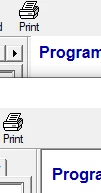
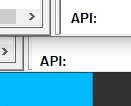
[These are 2 .CHMs opened in MS help and overlayed on each other: RH202 back RH2019 fwd]

In the images shown here the main window of the help viewer is proud of the parent dialog in a CHM created in RH 2020, but recessed (as desired) when created from RH 2019 Classic. I have gone through both the "Window Settings" and "Output Presets" for this CHM and no combination of check boxes I have selected has resolved this. I even created a New Project from scratch in RH 2020 to make sure it's not some unknown CSS or HTM formatting that is causing the main html window to display this way. The same layout issue appears at the bottom of the main window also as seen in the second window.

    This topic has been closed for replies.

    3 replies

    Community Expert
    February 9, 2023

    All I can suggest is contacting Adobe support. The email address is recommended as it goes to a dedicated Robohelp team. https://helpx.adobe.com/contact/enterprise-support.other.html#robohelp


    And vote on the existing issue report. 🙂

    The Atom Proj
    Participating Frequently
    February 9, 2023

    Internet Explorer Compatability in CHM vs latest Web browsers
    It seems to me that this issue is related to Internet Explorer compatability and how it's defined either across the html documents or within the default Windows CHM viewer.
    I made a Test project in RH2019 Classic that displays the desired (sunken) main content window and then imported that project into RH2020. The glaring difference between the two html files was that the RH2020 added:

    <meta http-equiv="X-UA-Compatible" content="IE=9"/>


    So I downloaded another CHM authoring tool "HelpN..." to test if it produced the same results as RH2020. When using all of the default settings it produced the same (incorrect) results. Upon viewing the resulting source for the html page I saw a similar entry:

    <meta http-equiv="X-UA-Compatible" content="IE=edge">


    However this application has an Internet Explorer compatability property that allows changing various versions of IE: 5,6,7,8,9,11,Edge,System Default. Using any value greater than "IE=8" results in the CHM displaying the main html window incorrectly. In the case of selecting System Default the X-UA-Compatible property isn't even added to the html documents.

    What does this mean?
    CHM files by default use the old browser control IE=7 by default, but [as I understand it] it can be overridden using the X-UA-Compatable property so that newer content (HTML5 and CSS3) can be rendered the same as if it was viewed in the latest web browser.

    So I'm not sure if the solution is that some CSS property needs to be set to move and resize the main window that displays the actual html content or if there needs to be an option (is there one already?) to change the X-UA-Compatible** property in RH2020. It's reasonable to conclude that if this is set that all of the html content will be rendered under that IE version and as such not display newer content the same as it would in a new web browser.

    **The X-UA-Compatible entry is added at compile time so I can't just edit all the HTML documents to exclude it.

    Community Expert
    February 9, 2023

    I think this was reported a few years ago. You can vote on the issue to hopefully get it prioritised.

    https://tracker.adobe.com/#/view/RH-10393

    The Atom Proj
    Participating Frequently
    February 9, 2023

    Apologies, I didn't use the exact right words when I searched for this before posting my inquery.
    It's got to be some property that is being set incorrectly in RH2020 that (one would think) would be easy to modify.
    Is it the DOCTYPE of the html, CSS property of the content, launch property of the hh.exe?
    I feel like I need to make a simple .chm in both versions of RH and diff the contents to get to the bottom of this. grrr...