


Inspiring
March 14, 2022
Answered

RoboHelp 2020 Crashes Not Functional Upon Starting

  • March 14, 2022
  • 5 replies
  • 932 views

I have W10, 64 Bit, RoboHelp 2020.7.46


I just upgraded an old project and that all worked OK.


When I now run RoboHelp 2020, the software runs and I can click on items, but nothing happens. For example, I click on File New Project and nothing happens. Same is true if I try to open a current project either from the Start Screen or Recent Projects.


I have reinstalled a few times. I have not uninstalled and reinstalled yet but this has been happening multiple times and I do not want to have to uninstall / reinstall each times it happens.


I did notice RoboHelp 2020 is running 8 times.
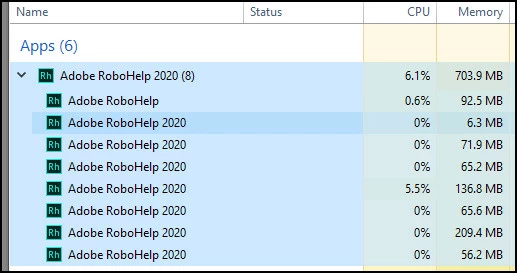
 

I have tried running as an Admin, but no change.


I have renamed these to OLD but not change.

C:\Users\<user name>\AppData\Roaming\Adobe RoboHelp 2020_OLD

C:\Users\<user name>\AppData\Roaming\Adobe\RoboHelp\\2020_OLD


Any suggestions?


Shawn

 

This topic has been closed for replies.
Correct answer Peter Grainge

It does not have to connect everytime, it just phones home every so often. Regardless of whether you have a connection those options should be there. You really need to take this up with Support. See the link earlier.

________________________________________________________

My site www.grainge.org includes many free Authoring and RoboHelp resources that may be of help.


5 replies

Peter Grainge
Community Expert
Peter GraingeCommunity ExpertCorrect answer
Community Expert
March 17, 2022

It does not have to connect everytime, it just phones home every so often. Regardless of whether you have a connection those options should be there. You really need to take this up with Support. See the link earlier.

________________________________________________________

My site www.grainge.org includes many free Authoring and RoboHelp resources that may be of help.


Use the menu (bottom right) to mark the Best Answer or Highlight particularly useful replies. Found the answer elsewhere? Share it here.
srmsrmAuthor
Inspiring
March 17, 2022

Thank you


I plan to contact support.


For the install type, just one licene on my computer. It is not Tech Comm Suite or part of some volume licensing agreement?

Community Expert
March 16, 2022

I just remembered that for a while I had a problem where the first time I opened RH2020 for for the day I couldn't click on the menus to open projects. I would close RH and reopen and everything would work fine.


It's not doing that now though, so I can't offer a suggestion for a permanent fix.

srmsrmAuthor
Inspiring
March 17, 2022

Amebr


Thank you. Good to know I am not the only one who encountered this issue.


I just tried to run RH, and again it is not working. It is very random. As I was typing this reply, after exiting and reopening RH a few times, it now works. The Exit command under the File menu is one command that still works (instead of using Task Manager to close RH) as of now when I run into the issue. I doubt closing and opening fixes the issue, but at least (for now) it may allow me to get the software working if I keep encountering the issue.


As Peter noted, the Manage My Account and Sign Out are not there. I don't know how Adobe key system works, but at times its as if RH is not connecting to whatever authorizes the software to run.


Shawn


Jeff_Coatsworth
Community Expert
Community Expert
March 17, 2022

Did you install RH as part of the Tech Comm Suite? Or are you part of some volume licensing agreement? That might explain the difference in your Help menu appearance.

Peter Grainge
Community Expert
Community Expert
March 14, 2022

You will get the option to save or discard your settings. Try with Save first.

________________________________________________________

My site www.grainge.org includes many free Authoring and RoboHelp resources that may be of help.


Use the menu (bottom right) to mark the Best Answer or Highlight particularly useful replies. Found the answer elsewhere? Share it here.
srmsrmAuthor
Inspiring
March 14, 2022

Peter:


The uninstall / reinstall work. So far so good with my settings restored. Thank you.


Shawn

srmsrmAuthor
Inspiring
March 15, 2022

Peter:


Ran into the same issue. Went to work on my RH file and nothing works.


Shawn

srmsrmAuthor
Inspiring
March 14, 2022

Peter:


Thank you.


I'll try the uninstall/reinsttall.


Are there settings I can keep or do I have to reset everythign again on reinstall?


Shawn


Peter Grainge
Community Expert
Community Expert
March 14, 2022

The screenshot you show is normal. I suggest you do uninstall and then reinstall to clear the problem.


I think that will work but if not then I suggest you contact Support. See https://helpx.adobe.com/contact/enterprise-support.other.html#robohelp for your Adobe Support options. The email link tcssup@adobe.com is recommended as it reaches a team dedicated to Technical Communication Suite products including RoboHelp. 

________________________________________________________

My site www.grainge.org includes many free Authoring and RoboHelp resources that may be of help.


Use the menu (bottom right) to mark the Best Answer or Highlight particularly useful replies. Found the answer elsewhere? Share it here.