



Mark_Noc
Inspiring
March 2, 2021
Answered

RoboHelp 2020 > Frameless > Syntax Highlighter Not Working (Prism.JS) On Server, But Is Fine Locally

  • March 2, 2021
  • 15 replies
  • 1723 views

Hello! I'm using Prism.JS (https://prismjs.com/) to generate syntax highlighting for XML markup in the docs I'm writing. Locally, this all works well and looks great, but when the files are uploaded to the server it stops working. You can see the live example here:

https://docs.flightsimulator.com/html/Content_Configuration/Sounds/Sound_Examples.htm


It should look like this:
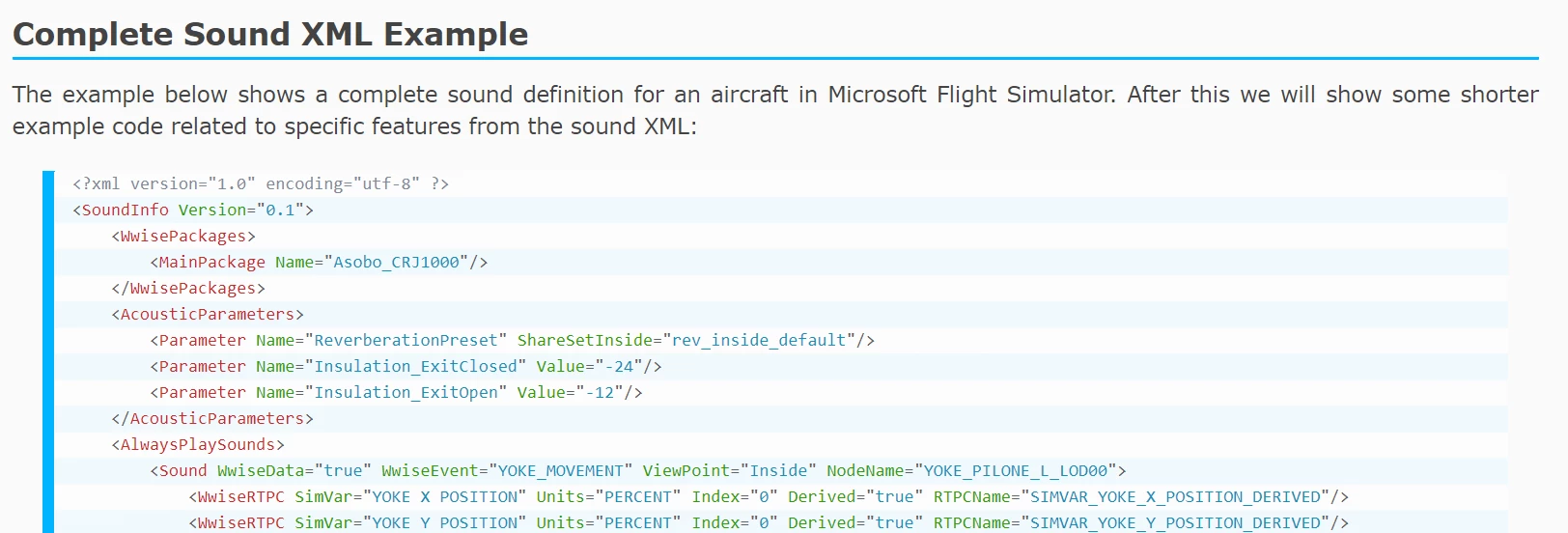
Note that refreshing the page briefly shows the code with highlighting then it breaks...


Checking the console output on the browser, I see no errors and the page should load fine, so my question is WHY is the online version not working and what can I do to resolve it? I suspect it's got something to do with the RoboHelp async loading of JS files required to build the ToC etc... but I have no idea how to resolve the issue.


Note I've tested on Chrome and Edge and they both show the same issue, but Firefox seems to load everything fine.

This topic has been closed for replies.
Correct answer Mark_Noc

Just to update this topic... The issue has been identified as a bug by the Adobe Support team and is scheduled to be fixed in RH 2020 Update 5, which - unfortunately - they don't have a timeline for. Thank you everyone for the replies and attempts to help me resolve this!

15 replies

Community Expert
March 4, 2021

See the following page for support contact options:
https://helpx.adobe.com/contact/enterprise-support.other.html#robohelp

Mark_Noc
Mark_NocAuthor
Inspiring
March 4, 2021

Hello! Yes, I've tried moving the Prism script call to other parts of the HTML and it doesn't change anything. And yes, the RH editor doesn't mind if I do defer="defer" at all, it's just having defer on it's own it hates! Also, sadly, the HTML that is calling the RH scripts with async is autogenerated and I can't edit it in any way it seems or I'd test removing the async call from them... 

Community Expert
March 3, 2021

I know sometimes just adding "async" to the tag causes editors to have fits, and making it async="async" calms them down. It could be similar with "defer".


Another trick is to add the script at the bottom of the page rather than in the head. Have you tried that?

Mark_Noc
Mark_NocAuthor
Inspiring
March 3, 2021

Hello Amebr and thanks for the reply! I have tried using "defer" (which RoboHelp HATES as it thinks it should be assigned a value, so I had to modify the files AFTER building to test), but it doesn't help as the scripts that are causing the page refresh are being loaded with the "async" flag so they're still being run after the prism.js loads (async kinda renders defer as useless...). I've also tried various other JS methods to check when the entire page has loaded, but none of them detect async loading and only work on full DOM elements being loaded, which happens before the async stuff finishes... 😞


I think I might have to contact support on this one...

Community Expert
March 3, 2021

Theorising here as I haven't tried it.


Could you add "defer" to the script tag to force the prism script to run last? (at least I think that's what it means, not being a programmer.)


https://javascript.info/script-async-defer