
Known Participant
November 3, 2020
Question

RoboHelp 2020 - Highlight Text Tool

  • November 3, 2020
  • 2 replies
  • 328 views

Is the highlighter text tool available in v2020?

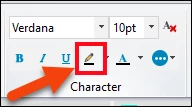
In v2017, it was on the Edit panel (see screenshot), but I cannot seem to locate it in v2020. I use the highlighter to highlight text that I need to come back to as I need to find answers/clarify, where I need to insert a screenshot etc. I have looked in the Properties panel, but it is not obvious to me where it is. I feel like such a dummy not being able to locate it. It's probably right in front of my face, but I'm going crazy looking for it....
    This topic has been closed for replies.

    2 replies

    Peter Grainge
    Community Expert
    Community Expert
    November 3, 2020

    Assuming that screenshot is from the General tab with the text to be highlighted selected, yes.


    Use the menu (bottom right) to mark the Best Answer or Highlight particularly useful replies. Found the answer elsewhere? Share it here.
    Known Participant
    November 3, 2020

    I might have answered my own question. Is it the 'Shading' field in the 'Background' section of the Properties panel?