


Participant
August 31, 2022
Question

RoboHelp 2020 Output Microsoft HTML Help (.chm) ERROR

  • August 31, 2022
  • 4 replies
  • 108 views

I am running RoboHelp 2020 Update 8. I had to upgrade my 2019 project file (.XPJ) to .rhpj. I am having issues with generating a CHM and also my file sychronization with VSTS is now broken.


With the CHM generation, I receive the Script Error as shown below. Also, my breadcrumbs are no longer in the CHM.

Please help. I appreciate your feedback.

Thank you,

Marla
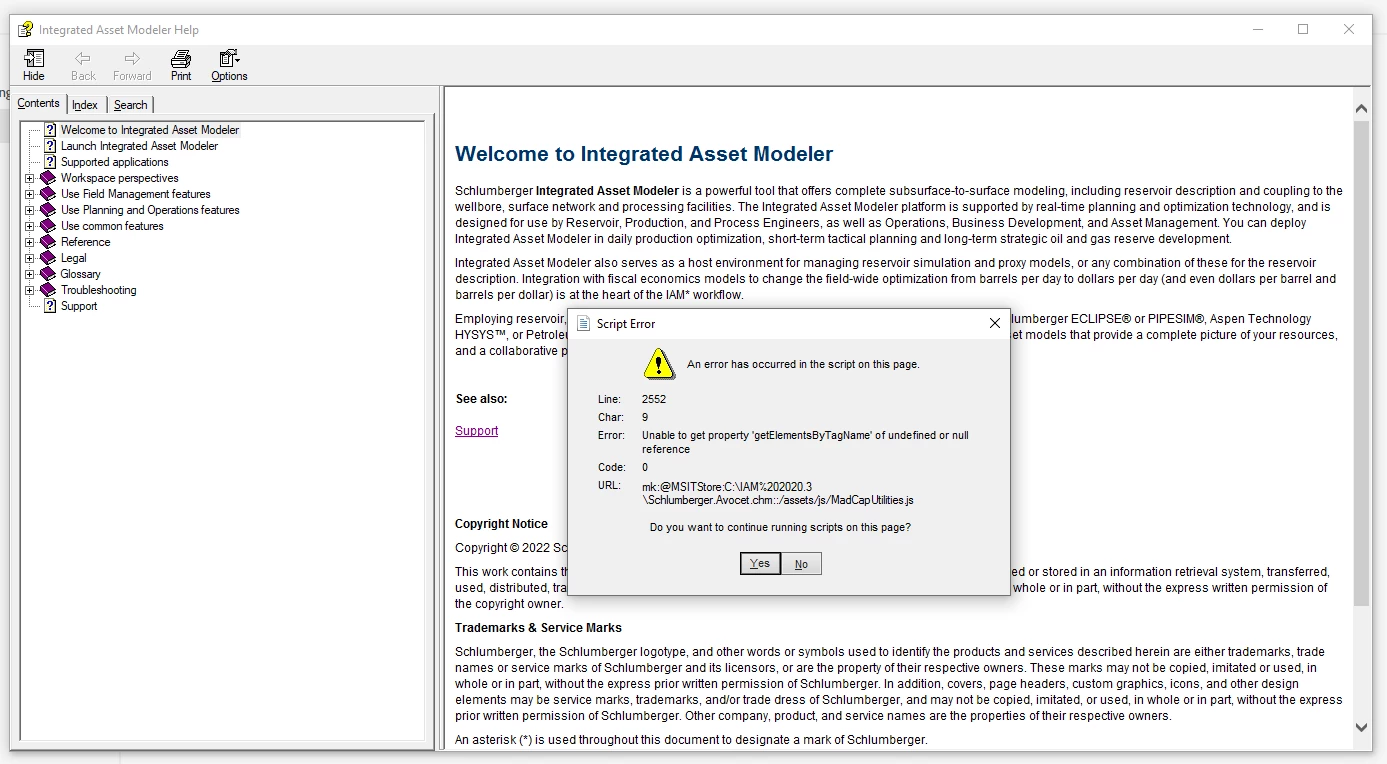
 

below

    This topic has been closed for replies.

    4 replies

    Community Expert
    September 1, 2022

    I would look for madcap javascript files in your assets/js folder and delete them. You might need to have a look at your topic code and do some cleanup as well, but I haven't done a conversion from Flare to RH so couldn't say for sure if or what that might be.


    It's been a long time since I used chm but I think the breadcrumbs are defined in the master page header section. Have you checked the placeholder is there after the conversion (user the Edit Header button to ensure you're in the right area)? If they are perhaps try deleting and re-adding.


    I imagine source control broke because the conversion from Classic to New UI creates a whole new path and file structure for the project, but I'm not using source control or New UI so am not certain. I'm not sure what the recommendations are for this scenario. I would recommend contacting supporting using the email address at the following address as it goes to a dedicated RH team. 
    https://helpx.adobe.com/contact/enterprise-support.other.html#robohelp

    Jeff_Coatsworth
    Community Expert
    Community Expert
    August 31, 2022

    Sorry I don't know what VSTS is or what impact it has on your project. The fact that the sample generates fine means that something is messed up in your project. The reference in the screenshot error talks about some MadCapUtilities.js file - was this project a conversion from Flare at some point?

    Participant
    August 31, 2022

    Sadly, yes. It was converted from MadCap Flare. Sorry VSTS is Visual Studio 2017 where the source is stored. I will try a search on MadCap Flare.

    Participant
    August 31, 2022

    The sample project creates the CHM just fine.Of course, that is not synced with VSTS, so I can't test that scenario.

    For my converted 2019 project, I edited the Microsoft HTML Help preset General, Content, and Layout settings with the required items.

    • General: Title, Output Path, CHM File, Language. I left Post Generation Script null because I don't know anything about those.
    • Content: TOC, Default Topic, Index, Glossary, Condition Expression. Variable Set is null
    • Layout: Master Page, Default Window

    Thank you. Marla


    Jeff_Coatsworth
    Community Expert
    Community Expert
    August 31, 2022

    Did you set up new presets in RH2020 or are you just using whatever came from RH2019? Are you having the same issue with the sample project?