
Question
RoboHelp 2020: Variables panel no longer displays/previews variable values
RoboHelp 2020.1
- In RoboHelp 2019.14 (new), the variables panel displayed each variable's value; this made it very easy to see and select the variable you wanted to insert in a topic.
- In RoboHelp 2020.1, the panel only displays empty brackets and the variable Name (not its value).
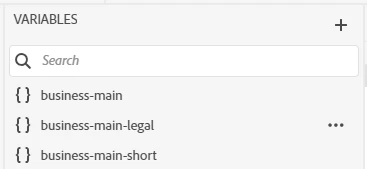
- You can right-click a variable and select Preview (or Edit) to see the value, but this is an extra step, and it's compounded if you don't select the variable you're looking for the first time - then you have to right-click/preview multiple variables to find the one you need.
Is this design intentional (and thus I need to log an enhancement request) or is it a defect (and thus I need to log a bug)?


 AdChoices