


Question
Robohelp 2020: Videos not playing in Responsive HTML5 output
I would appreciate any help/insight on this issue:
Videos play in the preview in the Author view and when viewing the output in Robohelp and when launching the output from Windows Explorer. But they won’t play when accessing the help output from the server as a client would access it (from the web).
Here are the details:
- I’m using Robohelp 2020.6.76
- The project was converted from Robohelp 2019 (Classic). The issue is occurring with all videos in the project: the ones that existed in the project before the conversion, and the new ones that we add post-conversion. We didn't experience this issue before the conversion.
- The videos were first imported into Contents of the project by right-clicking the folder and selecting Import > File.
- I’m adding the videos to a topic using the Insert Multimedia button and navigating to the folder in Contents where they are stored. The topics containing the video are hyperlinked in another topic.
- The videos are MP4s. They average about 28,000 KBs.
- When I click the Preview button in the Author view in Robohelp, the videos play just fine.
- When I generate Responsive HTML5 output and click View Output in the output view, they also play as expected. (the output opens in Chrome)
- I then push the output to the server where we load them so clients can access them on the web. We’re not using Robohelp server, but a server on Azure where we host the Help output.
- I log into the application (our software product) and click the Help button, which opens the responsive html5 output in Chrome.
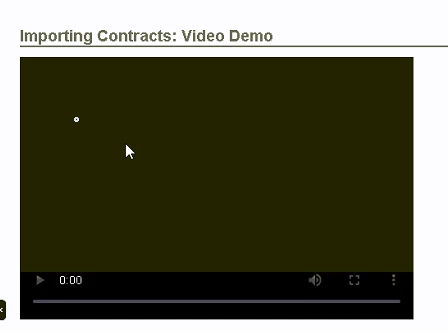
- I navigate to the topic where the videos are linked, click the video link, the topic opens, and there’s a video box with a play button, but the total time for the video shows “0” and the video is not showing. (see screenshot)
- I have cleared my cache in Chrome and tried again many times.
 AdChoices