

JenniR_12
Inspiring
July 9, 2024
Question

Robohelp 2022 3.93 - how do I turn OFF vertical alignment

  • July 9, 2024
  • 2 replies
  • 263 views

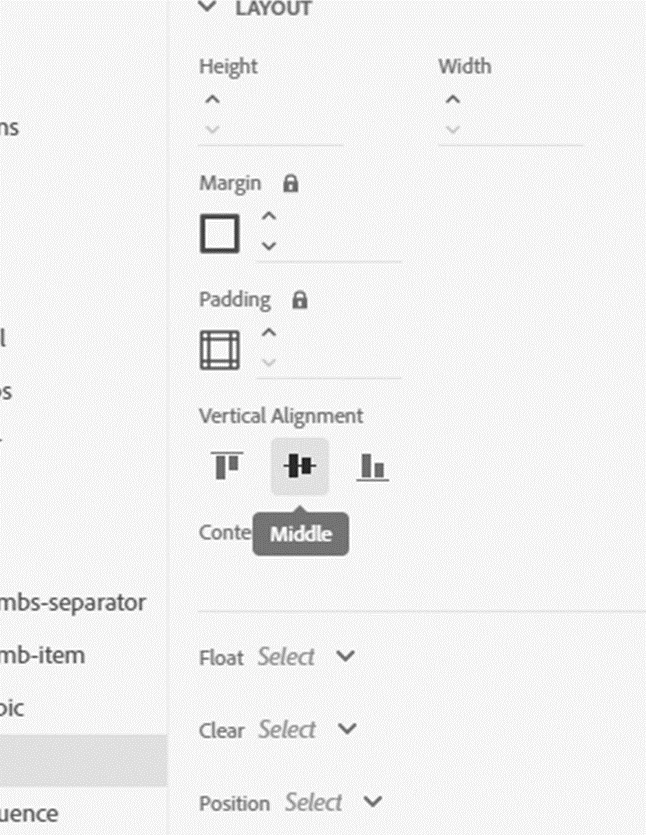
If I accidentally set vertical aligment to let's say "centered" and then decide I don't want it centered, is there a way to turn it back to whatever it was?  I haven't been able to figure that out since I started using RH 6 months ago.  I have tried clicking on the center button to  select and then deselect, but it won't turn off.  I'm editing the Oceanic template and I'm editing the Breadcrumb section but this happens all the time in both the Style editor and the template editor.  I don't necessarily want to set it to left right or center, but if I am testing something or trying to figure something out and I set it to center and then decide that isn't what I wanted to do and I want to change it back to whatever it was set at, how do I do that?
    This topic has been closed for replies.

    2 replies

    Peter Grainge
    Community Expert
    Community Expert
    July 10, 2024

    If you look at a default copy of the skin, the two are aligned.


    That means the difference is something you have changed. Two settings affect the text there. 

    Label

    Active Text


    First look at the vertical alignment of both. I think you will find that one is different. If not set both to the same. It can also be affected by things like different fonts, applying margins and so on.

    ________________________________________________________

    My site www.grainge.org includes many free Authoring and RoboHelp resources that may be of help.


    Use menu (bottom right) to mark as Best Answer or to Highlight particularly useful replies. Found the answer elsewhere? Share it here.
    Peter Grainge
    Community Expert
    Community Expert
    July 9, 2024

    It's not so much you turn if on or off as you change the default. If you don't like what you have changed it to, change it back to the setting you prefer.


    Your image is a bit too clipped. Exactly which setting is it you are referring to.

    ________________________________________________________
    My site www.grainge.org includes many free Authoring and RoboHelp resources that may be of help.


    Use menu (bottom right) to mark as Best Answer or to Highlight particularly useful replies. Found the answer elsewhere? Share it here.
    JenniR_12
    JenniR_12Author
    Inspiring
    July 10, 2024

    Vertical Alignment setting in the template editor is the setting that I'm referring to.  In my screenshot, you can see that the Active-Topic under Breadcrumb is not vertically aligned correctly. The vertical alignment appears to be just a tiny tiny bit off.  This was what I was trying to fix. 


    I opened the Ocean template and when I went to Topic Page and Breadcrumb and then Active-topic and set the vertical alignment to center (nothing was selected on the vertical alignment initially).  This did not resolve the issue and I simply wanted to turn the center button off.  I wanted to set it back to nothing or just visually be able to see that I put it back like I found it.  I don't want to leave it at centered and screw something else up down the road that I just don’t know about yet..  So I tried to press the button again to "deselect or turn it off" but it’s not a toggle button  What is the default vertical alignment?  I just wanted to return it to the way I found it is all.  

    Jennifer Rogers