Known Participant
February 6, 2024
Answered

RoboHelp 2022.3 changing lowercase letter in filename to uppercase when generated

  • February 6, 2024
  • 8 replies
  • 1758 views

When we generate the help file using RHTML, it picks a random file and makes one of the characters uppercase (title case). It's happened twice now. For example, we have the topic filename Program_Summary_window.htm and it changed it to Program_Summary_Window.htm for the generated file. This works fine on my system either way but when our programmers take it, it doesn't "reference" properly. I'm guessing they are not taking a whole, "fresh" file but are merging it in with the old one from the last release, but I am waiting to hear from them. Regardless, how can we stop RH from changing the case in the filename? Why is it doing this? Is it taking the filename from the topic title (which is upper/lower, sentence case)? BUT for whatever reason, it's NOT doing that to others that are set up the same way. Also, last release (month), it did it to a different file. This release (month), it picked this file. We can't figure out why and when it's doing this. It seems to only pick one file each time. So odd and random...  

    This topic has been closed for replies.
    Correct answer Peter Grainge

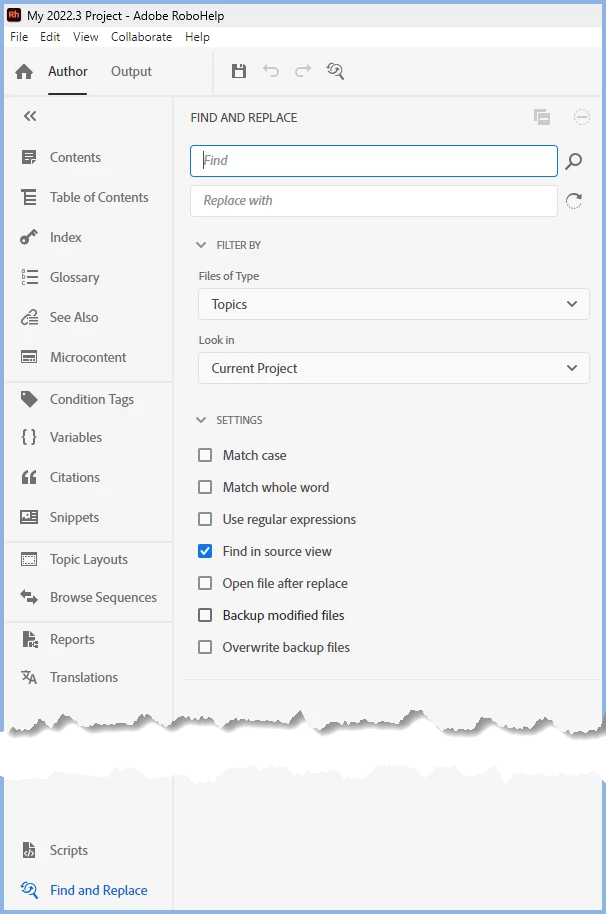
    You can search using Find and Replace set to Source View. Be careful with the Backup Options. It could create a ton of files.

    Match Case could be useful.


    ________________________________________________________

    My site www.grainge.org includes many free Authoring and RoboHelp resources that may be of help.


    8 replies

    Peter Grainge
    Community Expert
    Peter GraingeCommunity ExpertCorrect answer
    Community Expert
    February 7, 2024

    You can search using Find and Replace set to Source View. Be careful with the Backup Options. It could create a ton of files.

    Match Case could be useful.


    ________________________________________________________

    My site www.grainge.org includes many free Authoring and RoboHelp resources that may be of help.


    Use menu (bottom right) to mark as Best Answer or to Highlight particularly useful replies. Found the answer elsewhere? Share it here.
    Peter Grainge
    Community Expert
    Community Expert
    February 7, 2024

    Hyperlinks shouldn't change case but I'll leave that with you.


    Look in C:\Users\YOURUSERNAME\AppData\Roaming\Adobe\RoboHelp\2022\scripting for the scripts. If not there I have attached the one you want. Just change the extension to .js.


    ________________________________________________________

    My site www.grainge.org includes many free Authoring and RoboHelp resources that may be of help.


    Use menu (bottom right) to mark as Best Answer or to Highlight particularly useful replies. Found the answer elsewhere? Share it here.
    Kdale2Author
    Known Participant
    February 7, 2024

    We also found a "ghost" topic... There was a link in the TOC to a topic that really didn't exist but was the same name ans another topic except with underscores and we think RoboHelp "helped" by creating this ghost topic... so many weird things. But like I said, the orginal help file for this was created ? years ago...I can't even remember how many years ago. So, that's why we are finding odd things. So, we changed those hyperlinks to cross references and found that  some were going OUTSIDE of the project and going to a folder in the source controlled files. WE THINK we've fixed the origninal problem along with others. We will find out tomorrow when the team uploads it into the build. 
    Thank you for the instructions and file! We will try that out! Also, is there a way to search through all of the topic HTML coding for a path or string of words without opening each project in the HTML view?  Thank you for being a wealth of information Peter!

    Community Expert
    February 6, 2024

    You aren't using that topic file name in the Start Page field in the output preset are you? I've seen that cause weird issues with just that file name in the past. 


    In case you are, the start page should either be "index.htm" - the standard file for websites - or a a unique file name that does not exist anywhere in your project. If you change it, you will need to work with your developers as that will affect their help calls.

    Kdale2Author
    Known Participant
    February 7, 2024

    no, it's not the start page. I think we might have figured out that it's hyperlink issues.

    Peter Grainge
    Community Expert
    Community Expert
    February 6, 2024

    Just a thought. Have you tried Find and Replace to see if it teases out anything? 

    ________________________________________________________
    My site www.grainge.org includes many free Authoring and RoboHelp resources that may be of help.


    Use menu (bottom right) to mark as Best Answer or to Highlight particularly useful replies. Found the answer elsewhere? Share it here.
    Kdale2Author
    Known Participant
    February 7, 2024

    Hey Peter! We think we figured out that someone used hyperlinks instead of cross-references and linked to outside files possibly. So we need to change all the hyperlinks to cross-references and I see on your site at https://www.grainge.org/RoboHelp_Tour/rh2022/authoring/scripts.htm that RoboHelp has supplied scripts and the Cross Ref Converter should do this for us, BUT when I select Scripts from the left panel, nothing is in it. Do we need to download these scripts from Adobe and if so, where and how? Our Scripts folder/panel is empty. 😞 Thank you so much for any help! We are up against a deadline. 

    Peter Grainge
    Community Expert
    Community Expert
    February 6, 2024

    Can you share the project? If you can, then see the Contact page on my site and send the project as instructed there. Do make sure you include a link to this thread and please do not email the project direct.


    Happy to take a look. 

    ________________________________________________________
    My site www.grainge.org includes many free Authoring and RoboHelp resources that may be of help.


    Use menu (bottom right) to mark as Best Answer or to Highlight particularly useful replies. Found the answer elsewhere? Share it here.
    Kdale2Author
    Known Participant
    February 6, 2024

    I can't share it sadly... I might could after going through a whole legal mess. We'll see if we can figure it out and if not, we might head down that road. Thank you so much for your suggestions! 

    Jeff_Coatsworth
    Community Expert
    Community Expert
    February 6, 2024

    It's unfortunate that RH doesn't have a utility to clean out old "cruft" (highly technical term there lol) in a project's content. At least Framemaker has the ability to do a "MIF-wash" that exports the content to a text-like file that you can reimport back into FM. Oh well, different platforms, different architecture...

    Peter Grainge
    Community Expert
    Community Expert
    February 6, 2024

    Can you share the project? If you can, then see the Contact page on my site and send the project as instructed there. Do make sure you include a link to this thread and please do not email the project direct.


    Happy to take a look. 

    Use menu (bottom right) to mark as Best Answer or to Highlight particularly useful replies. Found the answer elsewhere? Share it here.
    Peter Grainge
    Community Expert
    Community Expert
    February 6, 2024

    Is this definitely when you generate rather than publish? When you generate, all files are deleted from the target folder first. As a result I can't see how the problem could occur at that stage. I have not seen anyone report such an issue in about 25 years of using RoboHelp. I could see it happening with publishing as unchanged files don't get republished.


    The latter would account for it working for you and not the developers.


    That said it seems like you have checked things out thoroughly. Have you tried generating/publishing to new folders?

    ________________________________________________________

    My site www.grainge.org includes many free Authoring and RoboHelp resources that may be of help.


    Use menu (bottom right) to mark as Best Answer or to Highlight particularly useful replies. Found the answer elsewhere? Share it here.
    Kdale2Author
    Known Participant
    February 6, 2024

    Yes, I selected Generate and generated to an empty folder on my local drive and got the same thing. So odd. We might try just rebuilding the project. I'll let you know if we find a culprit. This same help project did not play well with frameless either. 

    Peter Grainge
    Community Expert
    Community Expert
    February 6, 2024

    Try just deleting the .rh folder.

    ________________________________________________________

    My site www.grainge.org includes many free Authoring and RoboHelp resources that may be of help.


    Use menu (bottom right) to mark as Best Answer or to Highlight particularly useful replies. Found the answer elsewhere? Share it here.
    Jeff_Coatsworth
    Community Expert
    Community Expert
    February 6, 2024

    What output format are you creating?

    Kdale2Author
    Known Participant
    February 6, 2024

    Responsive HTML

    Jeff_Coatsworth
    Community Expert
    Community Expert
    February 6, 2024

    Is it reproducible using a different template/preset or format (frameless?)