



JenniR_12
Inspiring
January 21, 2025
Question

Robohelp 2022.5.28 - Bullet sizes are too big or too small - how can I resize the actual bullet

  • January 21, 2025
  • 4 replies
  • 508 views

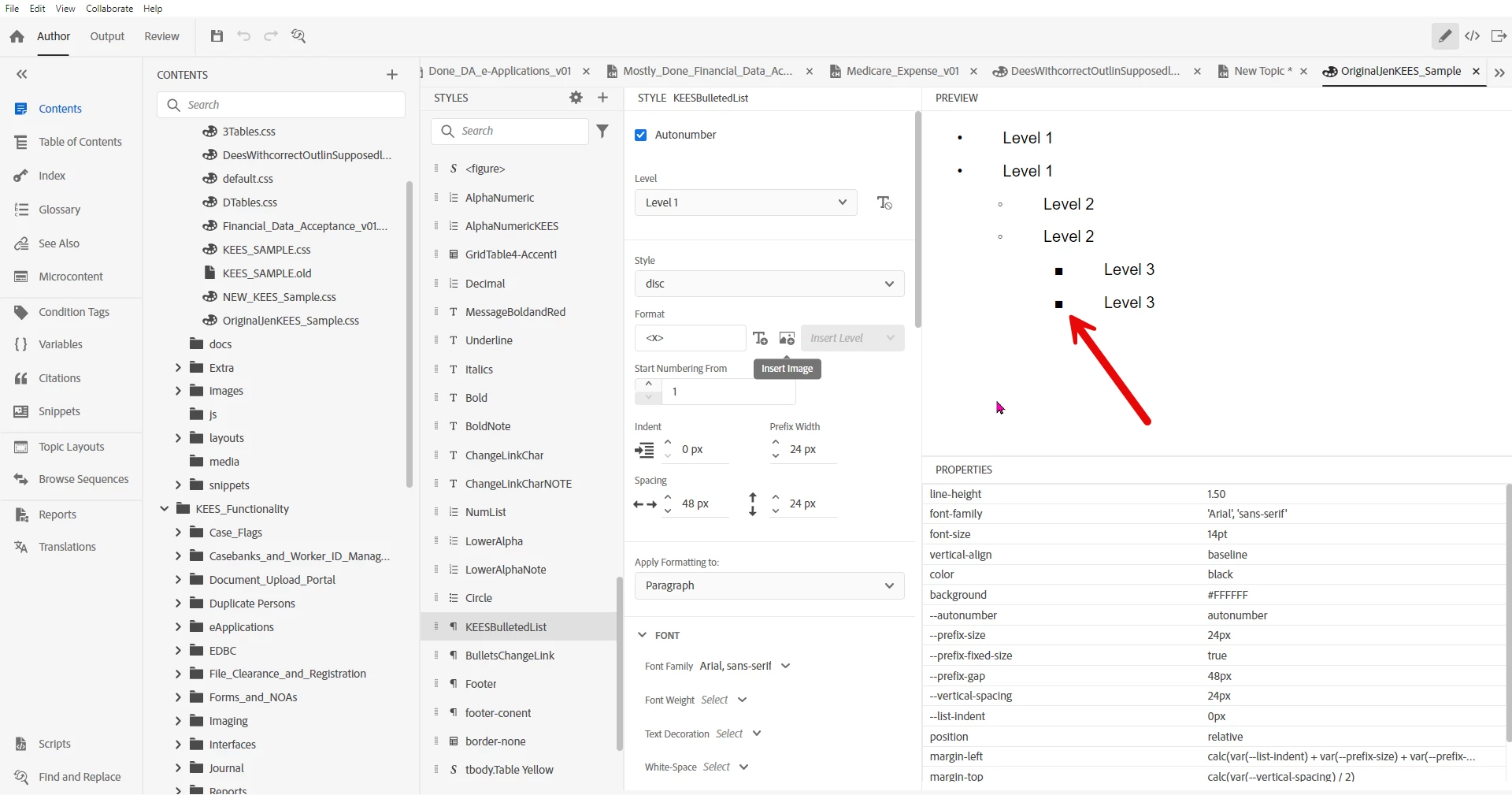
I'm setting up a bulleted list and I'm finding that the bullet for a level 3 bullet (square) is way too large and it looks completely out of place.  Is there a way I can control the size of the bullets?  
    4 replies

    Peter Grainge
    Community Expert
    Community Expert
    January 23, 2025

    Very few people have the knowledge to work with the lists in RoboHelp at code level. I believe early on when I helped you I cautioned against going into the Advanced settings. You can use it to get any mix of bullet type/size and text but as fast as you change say a bullet size, you have to realign the text, for example. You just have to try different things in the UI. I think you would eventually get what you want but it's not a five minute job.


    When the new UI version came out, there was no Advanced option. All the settings were shown. It caused so many problems that Adobe split the fields into those they felt most people could handle and those that caused the problems, such as this issue.


    As to you working at code level, check with your family first. Will they come and visit you in the psychiatric wing? 🙂

    ________________________________________________________

    My site www.grainge.org includes many free Authoring and RoboHelp resources that may be of help.


    Use menu (bottom right) to mark as Best Answer or to Highlight particularly useful replies. Found the answer elsewhere? Share it here.
    Jeff_Coatsworth
    Community Expert
    Community Expert
    January 21, 2025

    Always easiest to ignore what it looks like in the UI and make your changes in the CSS.

    Peter Grainge
    Community Expert
    Community Expert
    January 21, 2025

    When making changes to list styles, always do so in a copy of your CSS. There's no easy undo feature.


    If you want to make your changes via the UI, you need to select the Advanced option in the CSS editor. Beware, changing just the bullet size usually causes alignment issues and you then have to make changes to the alignment.

    ________________________________________________________

    My site www.grainge.org includes many free Authoring and RoboHelp resources that may be of help.


    Use menu (bottom right) to mark as Best Answer or to Highlight particularly useful replies. Found the answer elsewhere? Share it here.
    Inspiring
    January 21, 2025

    It just feels insane to me to not work with any kind of version control like Git. It's like rock climbing without any safety gear.

    Setting it up barely takes 5 minutes (including a coffee break) and can save you hours of reconstruction efforts. Especially when Robohelp bugs out and you lose your topics.


    Peter Grainge
    Community Expert
    Community Expert
    January 21, 2025

    @WoutJacobs Maybe but duplicating a CSS in RoboHelp is a context menu option and you are straight in to something you can play with. Doesn't work out? Trash it and start over. Surely just as quick and your original is still there.

    ________________________________________________________

    My site www.grainge.org includes many free Authoring and RoboHelp resources that may be of help.


    Use menu (bottom right) to mark as Best Answer or to Highlight particularly useful replies. Found the answer elsewhere? Share it here.
    Inspiring
    January 21, 2025

    Assuming you're using the default bullet list:


    ul.Disc>li>ul>li>ul>li {
      font-size: {number} px;
    }


    If you only want to control the bullet size:

    ul.Disc>li>ul>li>ul>li::marker {
      font-size: {number} px;
    }