



JenniR_12
Inspiring
October 15, 2024
Answered

Robohelp 2022 5.28 Output is only showing on 1/2 of my screen

  • October 15, 2024
  • 2 replies
  • 286 views

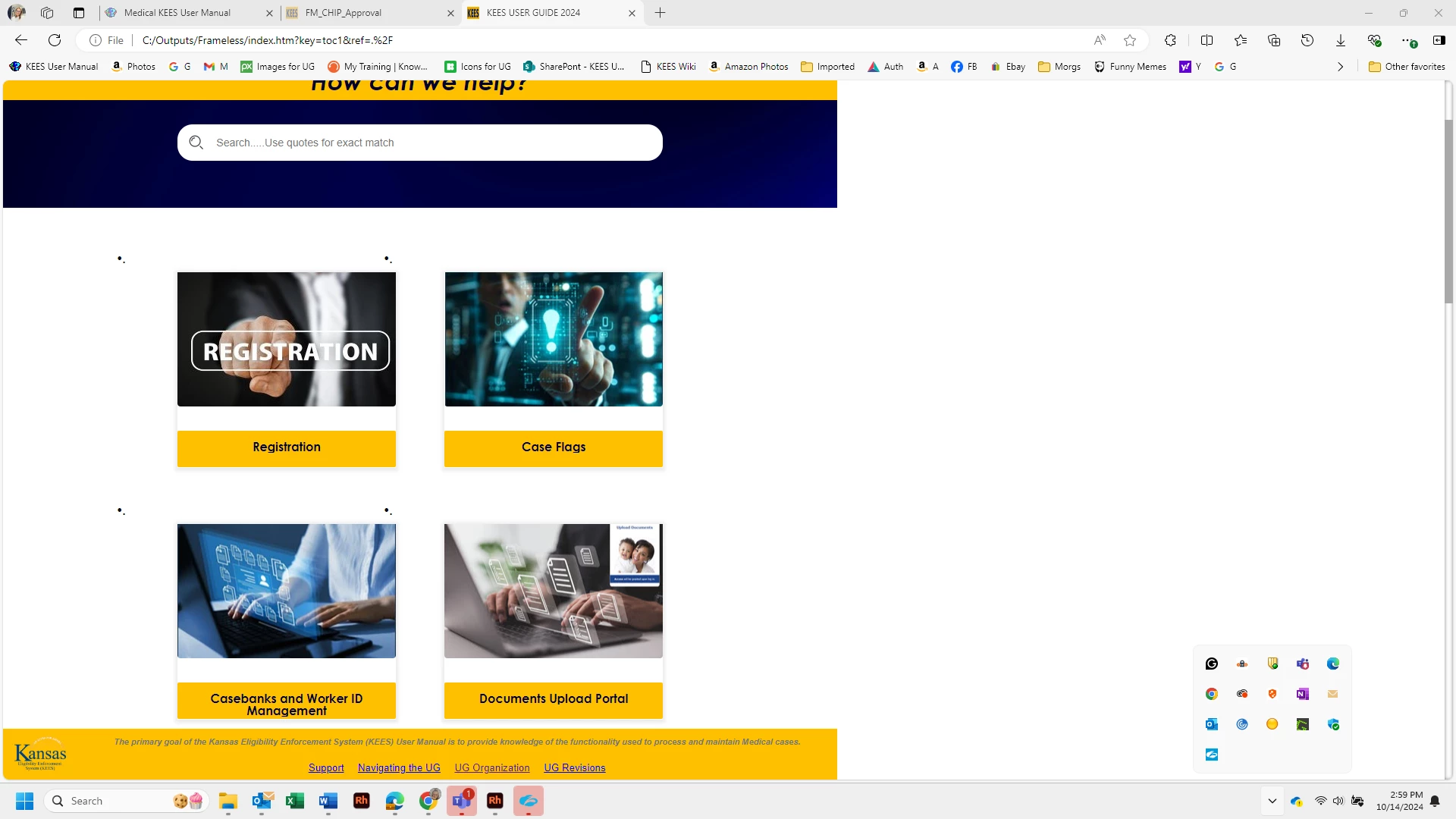
Hi.  Does anyone know what could be causing my output to be showing where it's only using 1/2 the screen size (Edge).  I just installed update 5 and so now I am runnning RH 2022 5.28.  I haven't generated and viewed in a few weeks but I am 100% that it was correct the last time I viewed it.  I have not a clue what's causing this or how to resolve.  I'mnot finidng anything when I search in the way of helpful information.  See below for example of what is happening.  There are 5-6 inches of blank white space on the righthand side. . Thanks in advance.  Jenni Rogers
 

    This topic has been closed for replies.
    Correct answer Peter Grainge
    1. Remove the max width line.
    2. Figure out how you added it. 
    3. Don't do it again. 🙂

    ________________________________________________________
    My site www.grainge.org includes many free Authoring and RoboHelp resources that may be of help.


    2 replies

    Peter Grainge
    Community Expert
    Peter GraingeCommunity ExpertCorrect answer
    Community Expert
    October 16, 2024
    1. Remove the max width line.
    2. Figure out how you added it. 
    3. Don't do it again. 🙂

    ________________________________________________________
    My site www.grainge.org includes many free Authoring and RoboHelp resources that may be of help.


    Use menu (bottom right) to mark as Best Answer or to Highlight particularly useful replies. Found the answer elsewhere? Share it here.
    JenniR_12
    JenniR_12Author
    Inspiring
    October 17, 2024

    Max Width - DUH!!  I should have caught that.  Thank you so much!!  You're the best.   😊

    Jennifer Rogers
    Peter Grainge
    Community Expert
    Community Expert
    October 15, 2024

    It's you! 🙂


    First thing to do with anything like this is test another output. Try the About RoboHelp sample project. I'm pretty sure that will confirm it is a project issue.


    With that out of the way, test a copy of a backup. Hopefully that will confim something has changed.


    I would  look first at the body tag in the CSS.


    I have assume the problem is the same when you get into the topics.

    ________________________________________________________

    My site www.grainge.org includes many free Authoring and RoboHelp resources that may be of help.


    Use menu (bottom right) to mark as Best Answer or to Highlight particularly useful replies. Found the answer elsewhere? Share it here.
    JenniR_12
    JenniR_12Author
    Inspiring
    October 16, 2024

    Hi Peter!!  Yes, it's me.  Unfortunatley.....

    As for your questions above, I tried on a different project and everything works fine which tells me that you are correct and that it is a problem with my project.  I looked and the topic pages also did not work.  I found that my most current backup had the same issues, but I pulled an earlier backup and that works.  So, I don't think I lost much in the way of data or content that was put in from the backup that works to what I have now.  I copied some htm files and the main project css from my current nonworking project to my desktop so I can copy into this working backup if I need to.  

    Just out of curiousity - I looked at the body tag.  What kinds of things would be in the body tag that would or could make a problem of this nature happen?  My body tag was this (I know this looks weird and I'm not sure why this actually looks like this .......I didn't make any changes to the body style on purpose).  I have been working with lists and liststyles and have been pulling my hair out and I don't know if something I'm doing in the lists is causing my body style to update????  If you have any thoughts or comments, let me know.  If not, that's fine, too.  I can limp along .......until I can't 😉  And then you will be the first person I contact 🙂

    Thanks, Peter.

    body {
    margin-top: 14pt;
    line-height: 1.50;
    margin-bottom: 14pt;
    font-family: 'Arial', 'sans-serif';
    font-size: 14pt;
    max-width: 1100px;
    counter-reset: Numbering31 0 Numbering32 0 Numbering33 0 p\.paranum11 0 p\.bullets-changelink1 0 p\.keesbulletedlist1 0;
    }

    Jennifer Rogers
