


RoboHelp 2022 - Applying styles from existing (converted) CSS
Hello. I have a project that I have recently converted from classic (2017) to RoboHelp 2022 (Version 2022.2.22).
I have an existing CSS that has styles for numbered, lettered, and bulleted lists. When I try to apply these list styles, either nothing happens, or it picks a random style that is not the list style.
I've found that I can copy an existing list from either the same or another topic and then edit it, but there has to be a better way than that. I can also edit the style in the code, but that of course takes longer than just clicking on the list style that I need. Existing lists from converted topics appear to be working fine.
Another wrinkle - if I apply a non-list style, and then try to change it back to normal (which appears to now just be <p>), again, nothing happens.
For example:
This has style <p> (I tried to apply my numbered list but it did not apply; the code verifies it's just <p>):
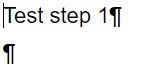
I change it to an indented style:
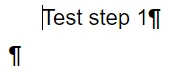
Then I decide I didn't want that, and want to go back to my normal <p> style - I select the text, double click on the <p> style, and it does not change it. The code verifies that it's still my indented style. I could change it to something else - a header style, and further indented style, but not back to the <p> style. I could edit the code...but why won't it just go back to it when I select it?
I hope I've explained this well. Also if this is a bug that is fixed in a future patch, please let me know. It takes 4-6 weeks to apply a patch so I can't do it right away, but it'll be good to know.
thanks!
Chris
 AdChoices