





Question
RoboHelp 2022 Bug: Extra topic after changing Title and File name
There's a bug that has been reported to Adobe. They have been able to reproduce the issue and have told me that it will be addressed in Update 1.
- Create a new topic.
- Right-click the topic and choose Properties.
- Change the title and filename.
Instead of the topic being renamed or retitled, you'll likely end up with two files (one with the new name and one with the original name undefined).
I created a topic named Yee_Hah. I then used the Properties dialog box to change both the Title and File Name to Renamed.
In the image below, notice how both Renamed and Yee Hah appear in the Contents list. And when I open the original topic (Yee Hah), the only content is the word "undefined."
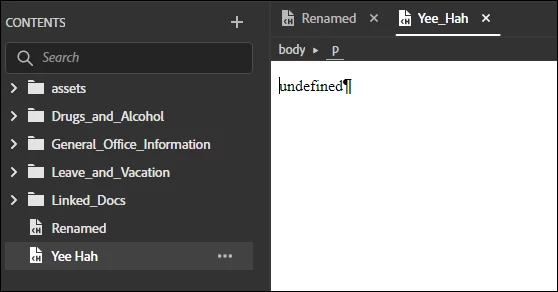
The stray topic goes away if you exit and restart RoboHelp. That'll have to be the workaround until update 1.
 AdChoices