


Known Participant
November 11, 2024
Answered

RoboHelp 2022: Extra paragraph marks in author view (that aren't really there)

  • November 11, 2024
  • 4 replies
  • 704 views

Hello.  I have a converted classic (2017) project; the 2022 version is Version 2022.2.22.


I have noticed that some (or many) topics have an extra paragraph mark in author view, but this paragraph is not there in preview mode, and the cursor in author view also indicates that it is not there.  In the example below (author view), the blank paragraph after the word "include" really is there.  The rest of them are not.  If I have my cursor after the "s" in the word Pends and press the right arrow, it skips the blank paragraph as if it wasn't there, and goes right to the P in Procedures.
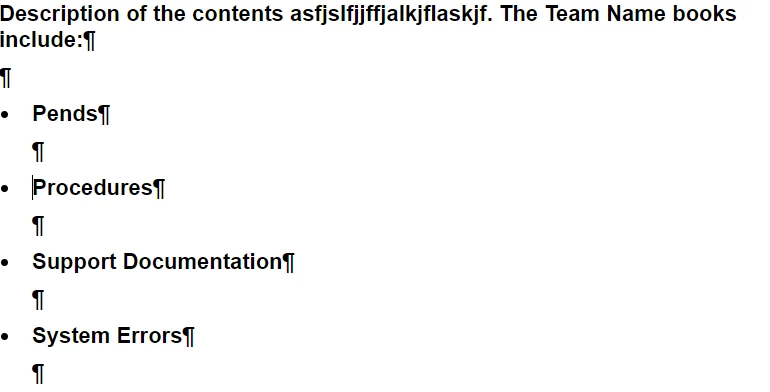


The preview of the topic looks correct:
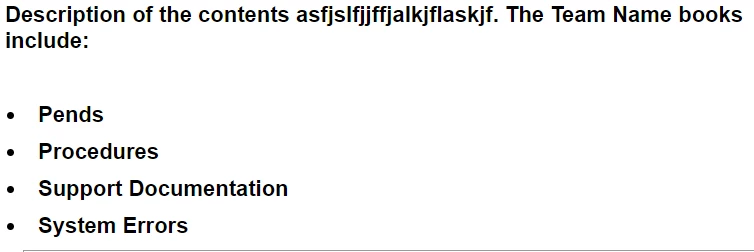


Is there something I can do to make the author view appear correctly?  The extra paragraph not appear after every item in a list - it does in this topic, but there are others where it is (seemingly) random - the first 3 items in the list might have no extra paragraph and then the 3rd and 4th do, for example.  Preview is correct and shows no blank paragraphs.


thanks!

Chris

    This topic has been closed for replies.
    Correct answer WoutJacobs

    Does the blank space disappear if you remove the (superfluous) p-tag within each <li>-tag?


    e.g. <li class="bulletspace"><p><b style="font-weight: bold;">Pends</b></p></li>

    => <li class="bulletspace"><b style="font-weight: bold;">Pends</b></li>

    4 replies

    Community Expert
    November 19, 2024

    The extra paragraph mark is correct, if confusing.


    It represents the closing tag. So when you have p tags inside li tags, you'll get a paragraph mark for the closing p tag and another paragraph mark for the closing li tag.


    So if we have the following html:

    <li><p>My text</p>

    </li>


    Imagine a paragraph mark replacing the closing tags, like so:

    <li><p>My text


    Known Participant
    November 21, 2024

    This is very helpful and prevented me from having to ask another question. 🙂


    It's easy enough to remove the extra paragraph marks since they had no impact on the output, and it looks cleaner in author view.  But I noticed extra paragraph marks for at the end of drop-downs as well, that were part of a list, so this response explains that as well.  I'll expect those to just be there as something to get used to.

    WoutJacobsCorrect answer
    Inspiring
    November 12, 2024

    Does the blank space disappear if you remove the (superfluous) p-tag within each <li>-tag?


    e.g. <li class="bulletspace"><p><b style="font-weight: bold;">Pends</b></p></li>

    => <li class="bulletspace"><b style="font-weight: bold;">Pends</b></li>

    Known Participant
    November 12, 2024

    Yes it does.  Thank you very much!  I can remove those as I edit a topic.

    Peter Grainge
    Community Expert
    Community Expert
    November 12, 2024

    In Classic you had a blank line below Description.

    <p><b style="font-weight: bold;">Description:</b></p>
    <p>&#160;</p>
     
    During the upgrade the second line lost the blank space code.
    <p></p>
     
    As you seem to have wanted that line in Classic, the code needs to be corrected.
    ________________________________________________________
    My site www.grainge.org includes many free Authoring and RoboHelp resources that may be of help.
     
    Use menu (bottom right) to mark as Best Answer or to Highlight particularly useful replies. Found the answer elsewhere? Share it here.
    Peter Grainge
    Community Expert
    Community Expert
    November 12, 2024

    To anyone reading this post later, ignore this reply. I misunderstood where the unwanted line was appearing.

    ________________________________________________________

    My site www.grainge.org includes many free Authoring and RoboHelp resources that may be of help.


    Use menu (bottom right) to mark as Best Answer or to Highlight particularly useful replies. Found the answer elsewhere? Share it here.
    Known Participant
    November 12, 2024

    That might have been my wording as well.  I was just trying to find the differences in the code, and that was one area where it was different, but I did want that space to remain.

    Jeff_Coatsworth
    Community Expert
    Community Expert
    November 11, 2024

    Flip to Code view instead of Author view to have a look at the underlying XHTML - you might see some cruft in there that's causing it. Compare the RH2022 version to the RH2017 Classic version to see any differences in that source coding.

    Known Participant
    November 11, 2024

    There are differences, but nothing that I can tell would cause this.


    Classic code:

    <?xml version="1.0" encoding="utf-8" ?>
    <!DOCTYPE html PUBLIC "-//W3C//DTD XHTML 1.0 Transitional//EN" "http://www.w3.org/TR/xhtml1/DTD/xhtml1-transitional.dtd">
    <head>
    <meta name="template" content="COOL Procedure.htt" />
    <meta http-equiv="Content-Type" content="text/html; charset=utf-8" />
    <meta name="topic-status" content="Complete" />
    <meta name="generator" content="Adobe RoboHelp 2017" />
    <title>Title</title>
    <link rel="StyleSheet" href="../cool.css" type="text/css" />
    <style type="text/css">/*<![CDATA[*/
    body {
    }
    /*]]>*/</style>
    </head>
     
    <body>
    <?rh-script_start ?><script src="../ehlpdhtm.js" type="text/javascript" 
    language="JavaScript1.2"></script><?rh-script_end ?>
    <?rh-placeholder type="header" ?>
    <p>&#160;</p>
    <h3>Title</h3>
    <p><b style="font-weight: bold;">Description:</b></p>
    <p>&#160;</p>
    <ul style="list-style: disc;">
    <li class="bulletspace"><p><b style="font-weight: bold;">Pends</b></p></li>
    <li class="bulletspace"><p><b style="font-weight: bold;">Procedures</b></p></li>
    <li class="bulletspace"><p><b style="font-weight: bold;">Support Documentation</b></p></li>
    <li class="bulletspace"><p><b style="font-weight: bold;">System Errors</b></p></li>
    </ul>
    <hr width="95%" align="center" />
    <?rh-placeholder type="footer" ?>
    <?rh-script_start ?><script type="text/javascript" language="JavaScript1.2">//<![CDATA[
    //]]></script><?rh-script_end ?>
    </body>
    </html>


    RoboHelp 2022 code:

    <?xml version="1.0" encoding="utf-8" ?>
    <!DOCTYPE html>
    <html xmlns="http://www.w3.org/1999/xhtml">
    <head>
    <meta name="template" content="../assets/layouts/COOL Procedure.htt" />
    <meta http-equiv="Content-Type" content="text/html; charset=utf-8" />
    <meta name="topic-status" content="Complete" />
    <meta name="generator" content="Adobe RoboHelp 2022" />
    <title>Title</title>
    <link rel="StyleSheet" href="../assets/css/cool.css" type="text/css" />
    <style type="text/css">
    /*<![CDATA[*/
    body {}
    /*]]>*/
    </style>
    </head>
    <body>
    <p><br />

    </p>
    <h3>Title</h3>
    <p><b style="font-weight: bold;">Description:</b></p>
    <p> </p>
    <ul class="bulletspace" style="list-style: disc;">
    <li class="bulletspace">
    <p><b style="font-weight: bold;">Pends</b></p>
    </li>
    <li class="bulletspace">
    <p><b style="font-weight: bold;">Procedures</b></p>
    </li>
    <li class="bulletspace">
    <p><b style="font-weight: bold;">Support Documentation</b></p>
    </li>
    <li class="bulletspace">
    <p><b style="font-weight: bold;">System Errors</b></p>
    </li>
    </ul>
    <hr align="center" width="95%" />
    <script type="text/javascript" language="JavaScript1.2">
    //<![CDATA[
    //]]>
    </script>
    </body>
    </html>


    Classic has <ul style="list-style: disc;"> whereas 2022 has <ul class="bulletspace" style="list-style: disc;">


    If I remove the red text from the 2022 version, it doesn't seem to make a difference; it still has the extra paragraph marks in author view but they do not appear in preview.


    Classic also uses <p>&#160;</p> for the actual blank lines and 2022 uses  <p><br />

    </p>


    If I try to change 2022 to match classic with the <p>&#160;</p> code, it just changes it back to the <br> code.


    As far as I can tell the header code looks as it should.


    Thanks!

    Chris