



Robohelp 2022 - Imported Word style all of a sudden shows differently in the style list in Robohelp
I just had our IT dept install the latest Robohelp update on my machine. I'm now running
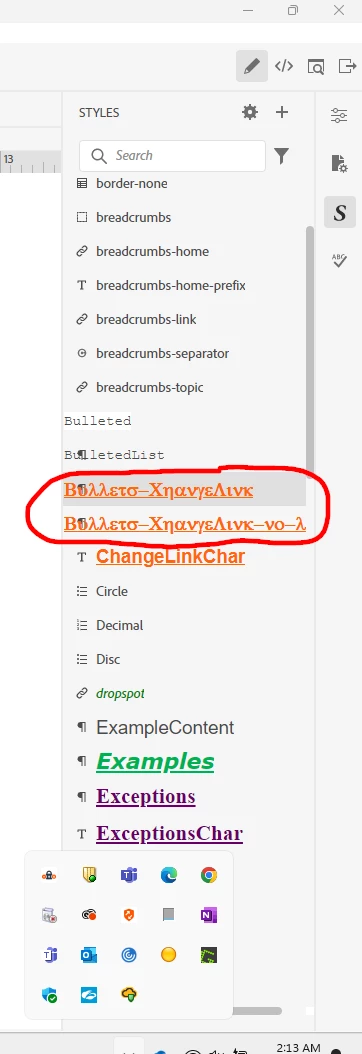
Robohelp 2022 4.179. As I was working today, I noticed that at least 2 of my styles that were imported from a Word document several months ago, now look like they might be corrupt. In the styles list in RH, the style is no longer showing the name of the style as it always has, but now it shows up in the list as some crazy bizarre font with symbols and letters. The style was originally named Bullets - ChangeLink and now it crazy. I guess I should say that it hasn't affected my documents asf ar as I know........ My pages where these styles were used, seem to still be formatted corretly. It's the name and the way it's showing up in the style list that bothers me. I believe something is or has happened and I'm worried that if I just ignore, it could be problematic down the road. Additionally, noone is going to know what these style do and we use them quite a bit. Has anyone seen this before and if so, any suggestions on what I need to do? I don't know that the update caused this, but the timing sure indicates that something happened when the update was installed. Prior to the update, the
styles looked correct in the list. The style names SHOULD read Bullets - ChangeLink and Bullets - ChangeLink No List.

 AdChoices