


Known Participant
November 14, 2024
Question

RoboHelp 2022 TOC - book with link; advanced options

  • November 14, 2024
  • 5 replies
  • 1160 views

I'm converting classic (2017) projects to 2022 (version 2022.2.22).  We have some TOC books with links and one of them links to an external link (a topic in another project).  In classic, if you click on the TOC book, the book opens so you can see the contents, and the external topic is opened in the main (right) frame.  It works the same way as if an internal topic was linked. After converting to 2022, the book does not open to show the contents, and the external topic opens in a new window.  Is there a way to change this?  I have verified that the book contents are still there if you go to edit the TOC; they just don't open in the output (responsive html).


Examples:

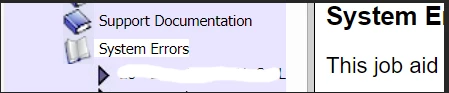
Classic output - the System Errors book links to an external topic; when you select it, it displays to the right and also opens the book:
 

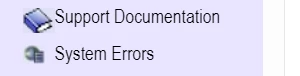
2022 output - the System Errors book is a book with contents when editing the TOC, but it appears in the output as a linked page instead; it does not open when you click on it, and external topic appears in a new window instead of to the right:
 

Also, I don't think this would help with this particular issue, but in classic there is an advanced tab where you can set the destination of a TOC item:
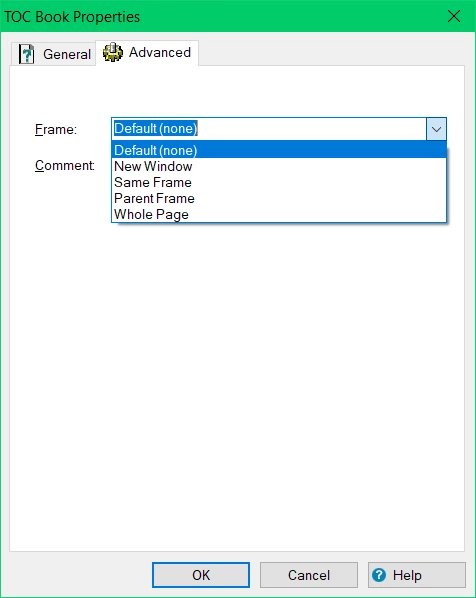
I can't find the equivalent of that in 2022 - does it exist?


thanks!

Chris

    This topic has been closed for replies.

    5 replies

    Peter Grainge
    Community Expert
    Community Expert
    November 15, 2024

    I do wish there was a list they would publish of "things you can't do anymore." 


    There aren't that many to be honest, it's more about what is different and the answer to that is virtually everything. You can always submit a feature request. If it can be done for topics, I don't see why not for sections.


    Please follow this link to report bugs or request new features. https://tracker.adobe.com. Post the link to your bug report / feature request in this thread and others can vote for it. The more people who do so, the higher it gets prioritised.

    ________________________________________________________

    My site www.grainge.org includes many free Authoring and RoboHelp resources that may be of help.


    Use menu (bottom right) to mark as Best Answer or to Highlight particularly useful replies. Found the answer elsewhere? Share it here.
    Known Participant
    November 20, 2024

    Thanks Peter.  I have added a feature request here:  https://tracker.adobe.com/#/view/RH-12804


    Peter Grainge
    Community Expert
    Community Expert
    November 20, 2024

    It's really a bug report you need to complete. As @Amebr has pointed out, the ability to add a link is there but as I have pointed out, editing the path has issues but more to the point, it breaks the TOC.

    ________________________________________________________

    My site www.grainge.org includes many free Authoring and RoboHelp resources that may be of help.


    Use menu (bottom right) to mark as Best Answer or to Highlight particularly useful replies. Found the answer elsewhere? Share it here.
    Peter Grainge
    Community Expert
    Community Expert
    November 14, 2024

    Sections can have links but not external links.

    ________________________________________________________

    My site www.grainge.org includes many free Authoring and RoboHelp resources that may be of help.


    Use menu (bottom right) to mark as Best Answer or to Highlight particularly useful replies. Found the answer elsewhere? Share it here.
    Known Participant
    November 14, 2024

    That's correct, and I should have specified.  I do have other books that link to a topic within the project and those work just fine.

    Known Participant
    November 14, 2024

    I do wish there was a list they would publish of "things you can't do anymore."  Text only popups were simply removed with no mention of them to be found (this was the biggest one; I changed them all to auto-sizing popups in classic which took a year, but they don't really auto-size in 2022).  You can't drag topics from the topic list anymore.  "Book with link" (the reason for this post) is not an option anymore, etc.  


    (Edit to add - this is certainly not directed to either of you)

    Peter Grainge
    Community Expert
    Community Expert
    November 14, 2024

    I don't think that Sections (books) can be linked to anything external. You can however right click in the TOC and select Insert > New Topic. That will open this dialog where you select the Web Page option and add the URL to where the external topic will be.


    There are no options of the type you mention for TOC entries. Double click a link in a topic and you will see those options.

    ________________________________________________________

    My site www.grainge.org includes many free Authoring and RoboHelp resources that may be of help.


    Use menu (bottom right) to mark as Best Answer or to Highlight particularly useful replies. Found the answer elsewhere? Share it here.
    Community Expert
    November 19, 2024

    Just to slightly correct Peter, you can get to this same dialog box for sections. Click the section and in the General section click the little browse icon next to the Source field.

    How that displays in the output is a different question. 🙂

    Peter Grainge
    Community Expert
    Community Expert
    November 19, 2024

    @Amebr It's bug ridden. Editing the path has issues but I think you can get round that by pasting the link in.


    The main bug is the topics in the section will not show in the output. 


    ________________________________________________________

    My site www.grainge.org includes many free Authoring and RoboHelp resources that may be of help.


    Use menu (bottom right) to mark as Best Answer or to Highlight particularly useful replies. Found the answer elsewhere? Share it here.
    Jeff_Coatsworth
    Community Expert
    Community Expert
    November 14, 2024

    Is this like a merged projects scenario?

    Known Participant
    November 14, 2024

    No, it's just a link to a topic in a separate project, so it's basically an external link.  It wouldn't even have to be a RoboHelp topic, in theory.  I could change that book to link to google.com in classic, and if I clicked on the book title, google would appear instead.  If I use any external link in 2022, it opens it in a separate window and doesn't expand the book.

    Jeff_Coatsworth
    Community Expert
    Community Expert
    November 14, 2024

    Sorry, when you say "separate project" my mind goes to a separate RH project, not some output someplace else. As long as the "separate project" files are always located in the same spot, then the method Peter describes would apply.