
RoboHELP 6 start-up problems on Windows Server 2008
Hello,
Our technical communication team has migrated the RoboHELP (RH) 6 environment for building the Help (HTML Help, WebHelp) from Windows 2000 Advanced Server to Windows Server 2008 (32-bit). I noticed that later RH versions do not officially support this operating system. Most probably this is the cause of our problems with this earlier version, too.
We want to use RH with the profile of a domain user account which has local administrative privileges (the user is a member of the Administrators group). After RH is correctly installed using this profile, this is the error message that is reported after the application is launched using the same profile:
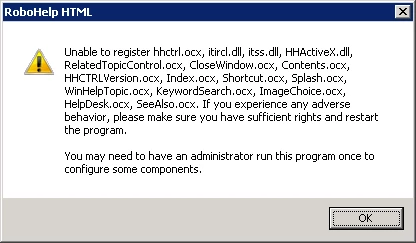
Searching the web, I stumbled upon some hints that insufficient privileges may be the root cause. I therefore removed RH and reinstalled it using the local Administrator account. The problem became less severe, however, RH still reported problems (when run either using the domain user account or the local Administrator account):
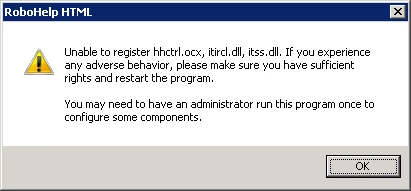
I then tried to disable User Account Control, register the problematic files manually (using regsvr32): all in vain.
I should note that I have manually installed the same version of the HTML Help Workshop on the system in advance (the same version that was installed in the Windows 2000 Advanced Server environment). I tried installing it with the same domain user account first, and then also tried with installation with the local Administrator account: both scenarios resulted in the above errors in RH. I also checked the HTML Help Workshop installation using MJsDiag (http://helpware.net/downloads/#MJs) and it lists the HTML Help Run-time Components as being registered properly. However, the Version dialog box of the HTML Help Workshop reported this:
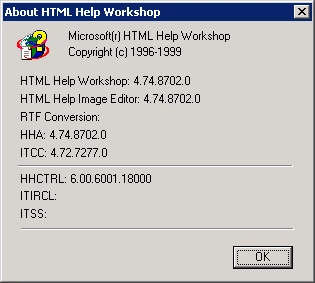
And a deeper look into the MJsDiag tool revealed this:
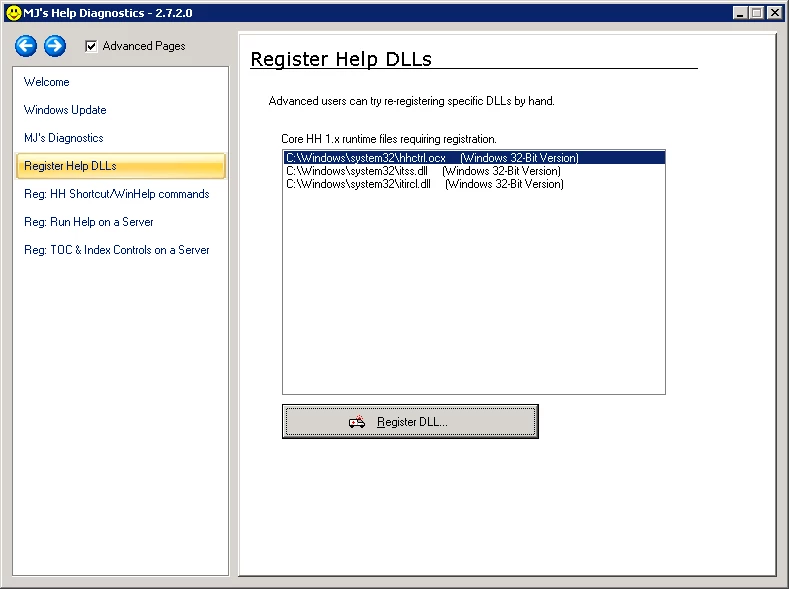
The problem is that I cannot register any of the not-yet-registered files even when the tool is run usin the local Administrator account.
Does anyone have a hint what I could be doing wrong?
Thanks in advance.
Boštjan


 AdChoices