Known Participant
December 2, 2011
Answered

Robohelp 7 - Runtime error when publishing

  • December 2, 2011
  • 1 reply
  • 1002 views

Hi all -

Of course I have a go live tomorrow night, and when I tried to publish changes tonight, I am getting a runtime error -
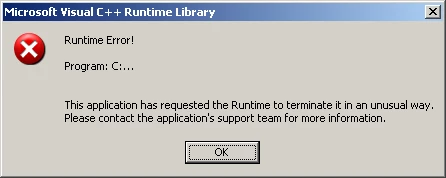
I've never had this problem before. I have tried rebooting, didn't help. I closed all open apps, no help. I have not made any changes to Robo, well - obviously if I'm using 7.0. I pushed changes as recently as 3 days ago without any issue.

I looked at some other threads, don't see anything that seems to point to a problem. When I get the error message, it closes immediately, which prevents me from viewing the debug info. I checked the Dr Watson log file, but it is not populated, so no help there.

Anyone experience this before? I'm running Windows XP Professional, SP3, i7 CPU, M620 @ 2.67GHz

Ready to tear my hair out...

Thanks.

    This topic has been closed for replies.
    Correct answer Peter Grainge

    There are a number of threads on this problem, I hope one helps. Here are two examples.

    http://forums.adobe.com/message/2293027#2293027

    http://forums.adobe.com/message/2363398#2363398

    For more enter Runtime Error in the search and in the results you can limit the answers by typing in RoboHelp. As this is an application problem, it could be the cause is addressed in other forums though.


    See www.grainge.org for RoboHelp and Authoring tips

    @petergrainge

    1 reply

    Peter Grainge
    Community Expert
    Peter GraingeCommunity ExpertCorrect answer
    Community Expert
    December 2, 2011

    There are a number of threads on this problem, I hope one helps. Here are two examples.

    http://forums.adobe.com/message/2293027#2293027

    http://forums.adobe.com/message/2363398#2363398

    For more enter Runtime Error in the search and in the results you can limit the answers by typing in RoboHelp. As this is an application problem, it could be the cause is addressed in other forums though.


    See www.grainge.org for RoboHelp and Authoring tips

    @petergrainge

    Use the menu (bottom right) to mark the Best Answer or Highlight particularly useful replies. Found the answer elsewhere? Share it here.
    AnahidMAAuthor
    Known Participant
    December 2, 2011

    Hi Peter -

    You really are a wonderful guy, I hope you know that. Adobe should be paying you a consulting fee.

    I went into add / remove programs, and it turned out I received an SMS package with a Windows update patch. Removing that allowed me to publish, which is great, since go live starts in 8 hours and I didn't have time to try and figure out how to clean up stuff manually. That would have been ugly (lots of changes).

    Have a wonderful holiday season!

    Anahid

    Peter Grainge
    Community Expert
    Community Expert
    December 4, 2011

    Thanks for the kind words.


    See www.grainge.org for RoboHelp and Authoring tips

    @petergrainge

    Use the menu (bottom right) to mark the Best Answer or Highlight particularly useful replies. Found the answer elsewhere? Share it here.