Inspiring
December 6, 2013
Answered

Robohelp 9 on Windows 7 64-bit: "Word not installed"

  • December 6, 2013
  • 1 reply
  • 2098 views

Windows 7 64-bit

Robohelp 9

Word 2010

I did check the forum for this discussion (in 2011) which suggested approaching Adobe for a file to fix the problem.

Adobe Support states that there is a long waiting line for support responses so i am posting in the hope that someone can help me sooner.

Is anyone able to direct me to a file download location for this solution?

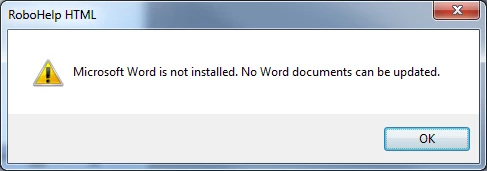
When i select to update linked word documents in a project i receive the following message:

  • Does i t matter if the projects are on a different partition to the installed software ?
This topic has been closed for replies.
Correct answer Peter Grainge

Yes it is 64-bit

When i attempt to generate a printed document  the process fails.

i get the following message while proceeding through the generate dialog:


The version of Microsoft® Word you are using has some known limitations with documents that contain a large number of list items (~1500). To avoid this problem, please download the latest Office 2000 service release (SR-2 or later). For more details, please see the online Help.

In the Output view panel i get the following message:

"A supported version of Microsoft Word does not exist. Please install Microsoft Word 2000 or newer."


@A Scribe

I suspect your issue is Rh is simply not seeing the 64 bit version of Word. The error message is wrong but it is the one Rh throws when it cannot find Word.

Email me via my site with a link to this thread and request an Adobe produced file that I can send you. I will need to know exactly which Rh version you have including the build number.

I would get Word changed to the 32 bit version regardless as you may have other issues with the 64 bit version. Microsoft advise the 32 bit version for compatibility with other apps.

@Joel

Did you run Word 2010 before attempting to generate the printed document?


See www.grainge.org for RoboHelp and Authoring tips

@petergrainge

1 reply

Peter Grainge
Community Expert
Community Expert
December 12, 2013

Did you resolve this by other means or is it still an issue?


See www.grainge.org for RoboHelp and Authoring tips

@petergrainge

Use the menu (bottom right) to mark the Best Answer or Highlight particularly useful replies. Found the answer elsewhere? Share it here.

Inspiring
December 16, 2013

No, not resolved.

My documents are on a sharepoint site. I have no problem relinking word documents as it simply raises an authentication prompt so i assume that the issue does not lie there.

Robohelp is installed on the C partition of my machine and i have a sotrage area on the D partition but i have tried moving projects betweent he two partitions in case that was a related issue but the problem remains regardless of the locaiton of the project.

Have you heard of this issue before ?

Maybe i should check this on the MS forums

Peter Grainge
Community Expert
Community Expert
December 16, 2013

Having Rh on the C drive and projects on another partition is not a problem, it is the way I always work.

Two thoughts to start with.

That your Word Normal template is not installed on your C drive, maybe it is on a network drive. Is that the case?

The other possibility is that you are using the 64 bit version of Word? I don't think that is the issue here as usually it will find Word but not work correctly.

Also see Print Issues on my site. The file referred to will not fix the problem as that is for a different error message. However, there are other solutions there.


See www.grainge.org for RoboHelp and Authoring tips

@petergrainge

Use the menu (bottom right) to mark the Best Answer or Highlight particularly useful replies. Found the answer elsewhere? Share it here.