Known Participant
March 31, 2011
Question

RoboHelp 9, Win 7, Word 2010: RH9 and Word not hooking up

  • March 31, 2011
  • 4 replies
  • 10335 views

Hello,

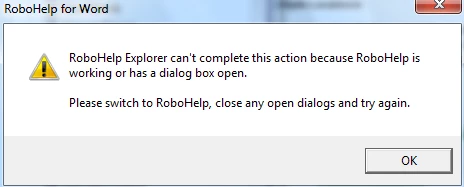
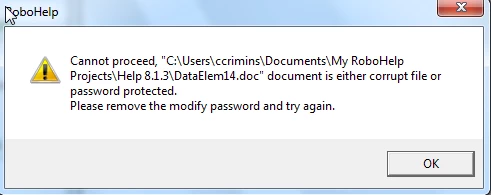
I just upgraded everything: Win7, Office 2010, RH 9 from RH 8. I first installed RH8 on this new system so I could install RH9 as an upgrade. Once that was done, I uninstalled RH8. Now I can start RH9 and it opens Word to show my default opening document. The RH toolbars are visible in the Word pane, but none of the options are functional. When I try to open a different document in the project, I get the messages below. There are additional errors from Word, which has to close itself and open again with a restored document.

I know from prior advice given here that it's past time to switch from RH for Word to RH HTML, but I would like to get comfortable with all these other upgrades before I make that step.

Thanks for any help offered.

Carma
This topic has been closed for replies.

4 replies

Known Participant
October 20, 2011

I have the same issues, and moving to a previous version of word is not an option (company policy). I'm working with an old legacy help system (it's huge) written in winhelp. Previously, when I upgraded from RH5 to RH7 I had word document corruption issues that I was able to solve somehow (should have documented that process). In this case, I've tried deleting affected .rtf's to have RH re-create them, but that doesn't seem to solve the problem. Word files get corrupted if I try to make changes to them. Oddly enough, this happens to a much lesser degree if I only open one word file at a time. This thread seems to conclude that users in this position are basically out of luck?

Peter Grainge
Community Expert
Community Expert
October 20, 2011

Which issues? There are a number here. Using Save All even to save one file has solved one person's problem but beyond that, I do not know when a fix will be forthcoming. That is something you will have to take up with Adobe.


See www.grainge.org for RoboHelp and Authoring tips

@petergrainge

Use the menu (bottom right) to mark the Best Answer or Highlight particularly useful replies. Found the answer elsewhere? Share it here.
Known Participant
October 25, 2011

The two popup messages in the original post is what I was referring to, Peter, in terms of what errors I am witnessing.

Participating Frequently
April 18, 2011

Thanks for the rapid reponse.  I'm using the 32bit version of Office 2010, despite running x64 Win 7 as I understand from Microsoft that the 64 bit version has "issues" and I just tried to create a new project with a simple word file created with Word 2010.  I got the same error complaining about a corrupt or password protected file which it clearly isn't.  I am yet to unistall RoboHelp9 but will do so now and then re-install and wil let you know waht happens.

Participating Frequently
April 18, 2011

Wow, I've done almost the same thing, but using a Win7 x64 machine.  I wish I could get as far as you.  RoboHelp9 for Word either simply fails to load previous projects or else complains that the Word documents are right write protected (which they are not), or if I try to import the word documents into RoboHelp9 HTML it complains that the version of Word that is installed is later than that required and please load an earlier version!  Now this is particularly gaulling because I just upgraded from 8 to 9 specifically so that RoboHelp was compatible with Office 2010.  I will try installing as suggested elsewhere in this thread but I have no faith that it will resolve the issues.  Has anybody had a seemless run with RoboHelp9/Win7 x64/Ofiice 2010 and legacy help files, and if so what was there solution.  Failing that how do you actually get to email Adobe's technical support.  Sorry about the last question but I'm a frustrated newbie with this, and this is the least on my problems

Peter Grainge
Community Expert
Community Expert
April 18, 2011

There aren't so many RoboHelp for Word forum supporters around these days but I'll try.

  1. Did you buy an upgrade and if you did, did you first uninstall the old version. Whilst you can have more than one version of RoboHelp HTML on a machine, that's not true of RoboHelp for Word.
  2. I think in Project Settings, there is a setting for the version of Word. Is that correct?
  3. Do you have the 64 or 32 bit version of Office installed? RoboHelp, like many apps, will only work with the 32 bit version of Office on a 64 bit machine.


See www.grainge.org for RoboHelp and Authoring tips

@petergrainge

Use the menu (bottom right) to mark the Best Answer or Highlight particularly useful replies. Found the answer elsewhere? Share it here.
Participating Frequently
April 18, 2011

BTW Peter

I really appreciate your responses as I understand that RoboHelp Word is rapidly becoming outdated and I want to convert to RoboHelp HTML.  Then maybe you will be albe to relaxe a little

Peter Grainge
Community Expert
Community Expert
March 31, 2011

Let me check I got that right. You installed 8, then 9, then uninstalled 8.

First you didn't need to install 8. Had you installed 9 first it would have detected 8 was not present and just asked you for your 8 serial number.

I suspect uninstalling 8 after installing 9 has damaged some setting so I would uninstall 9 and then reinstall it.


See www.grainge.org for RoboHelp and Authoring tips

@petergrainge

Use the menu (bottom right) to mark the Best Answer or Highlight particularly useful replies. Found the answer elsewhere? Share it here.
carma3Author
Known Participant
March 31, 2011

Hi Peter,

You are right, I installed 8 first, then 9, then uninstalled 8. I will follow your advice to un/reinstall 9 and report back. Thanks.

Carma

carma3Author
Known Participant
March 31, 2011

I have un/reinstalled 9 and now I have access to RoboHelp tools in Word, but still get the same two errors when trying to open a second document in Word or make any changes. Any other suggestions?

Thanks again.

Carma