Participating Frequently
June 4, 2019
Question

RoboHelp Added Spaces after Images in Output

  • June 4, 2019
  • 2 replies
  • 649 views

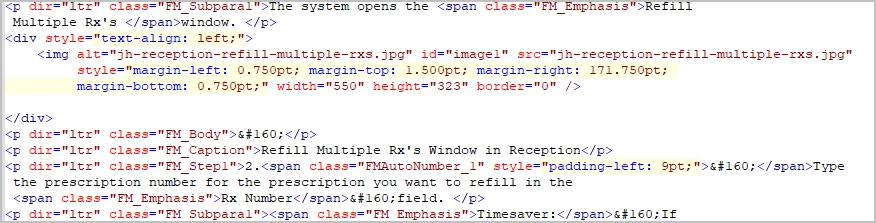
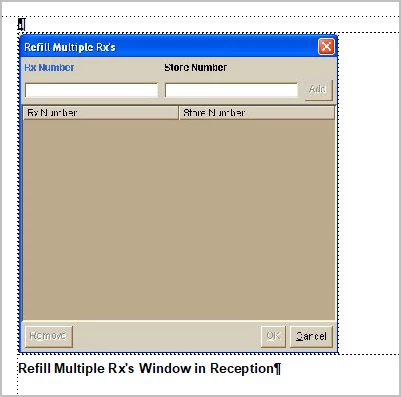
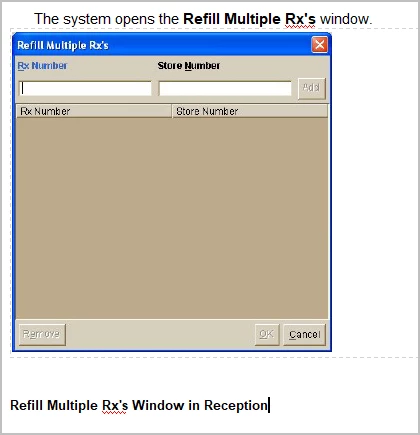
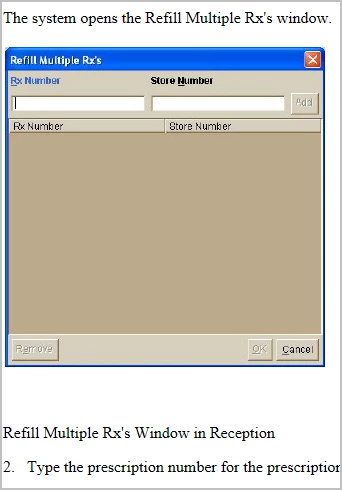
I am working with a 2000 page FrameMaker Manual. For screen shots I have a caption right under the screen shot that says the name of the window. However in the Robohelp output a space has been added after every image and the caption doesn't look like its a caption for the screen shot anymore. I cannot go through every page and fix it. So can you tell me how to map it correctly or what to do in frame to ensure that there is not an added space. I have attached a few examples: 1. a screen of the Frame file, 2. a screen of the RoboHelp project, 3. the html and 4. what the final output looks like.
And this is what the final output looks like:
This topic has been closed for replies.

2 replies

Jeff_Coatsworth
Community Expert
Community Expert
June 5, 2019

What versions of FM and RH? It's looking like the paragraph tag that has the anchored frame attached, is a Body paragraph that's getting translated to after the image in the RH project. You might want to experiment with attaching the anchored frame to the text above the image & see how that converts over.

Participating Frequently
June 5, 2019

Robohelp Classic 2019 and FrameMaker 2019 64 bit

Jeff_Coatsworth
Community Expert
Community Expert
June 5, 2019

Cool - are you importing or linking? Did you have this working in a prior version of FM/RH?

Peter Grainge
Community Expert
Community Expert
June 4, 2019

Moved to RoboHelp FrameMaker Intergration forum.


See www.grainge.org for free RoboHelp and Authoring information.

@petergrainge

Use the menu (bottom right) to mark the Best Answer or Highlight particularly useful replies. Found the answer elsewhere? Share it here.