



RoboHelp Background Image Issues
All, attempting to summarize the background image issue I've been having. I am following up with some different posts to try and respond to those who've attempted to help.
Our team has been using RoboHelp Classic, 2019. We're adopting the new user interface 2020 version.
When we have used the Upgrade RoboHelp Classic Project command to convert our existing templates and projects, everything converts pretty well, except the background images we have on the two master pages used in each project are "lost". The background images don't show up in the master page. Thus, they don't display in the html output.
I am unable to figure out how to place a background image in this version.
It was suggested that I upgrade to rh2020.7. This has not worked; I cannot get that version to install, despite having no issues getting the rh2020.6 version to install.
I have been able to see the master page when attaching it to the CSS body style. However, it displays in the topic while authoring; makes the text difficult to read.
I'd asked Peter Grainge if his technique (below) can be used in our case, when we have one image for the default topic, and another image for all other topics?
Hopefully this summarizes all of the issues/responses we've encountered while trying to adopt RoboHelp 2020 for our workflow.
"In the cover page topic add the two lines shown.
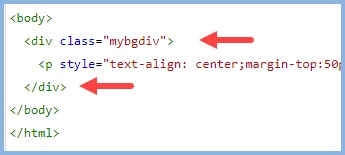 "
"
 AdChoices