


Participating Frequently
July 30, 2024
Question

Robohelp Classic 2019 Files Not Opening

  • July 30, 2024
  • 1 reply
  • 220 views

I have upgraded to Robohelp Classic 2019 from RoboHELP 11. 

When I click on a file in the Project Manager tab, it does NOT appear to right of the screen - screen shot below.

If I click View Item, the file displays correctly. I can create a file, but again, nothing displays.
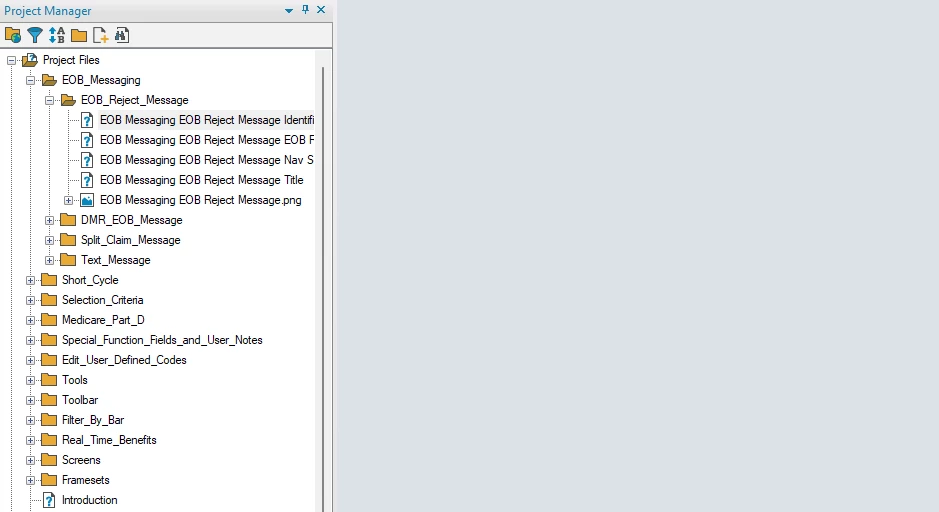
Screen shot below.

Any guidance? 

    This topic has been closed for replies.

    1 reply

    Jeff_Coatsworth
    Community Expert
    Community Expert
    July 30, 2024

    Is this immediately after upgrading the project? If so, I'd suggest saving it and restarting RH2019 Classic to see if that has any effect. If not, then you're looking at maybe deleting/renaming the .cpd file and opening the project again.

    Participating Frequently
    July 30, 2024

    Yes, after immediately upgrading. I shut down my computer, restarted, and opened the file again. I got this message: 

    I selected Upgrade and again, the files do not display. 

    Jeff_Coatsworth
    Community Expert
    Community Expert
    July 30, 2024

    Ok, something is going wrong there - provided you've made you RH11 project backup (best form for that is a ZIP file so you can't accidentally upgrade it by mistake), then the project should already be upgraded and not prompt you to do it again. Check to see if you've got the right project and that it's in the right location & then upgrade it fresh again.
    Did you install RH2019 Classic as an Admin?