
Participant
May 14, 2024
Question

Robohelp collaborate option is not working

  • May 14, 2024
  • 2 replies
  • 289 views

I am getting this below error while pushing few files to git.
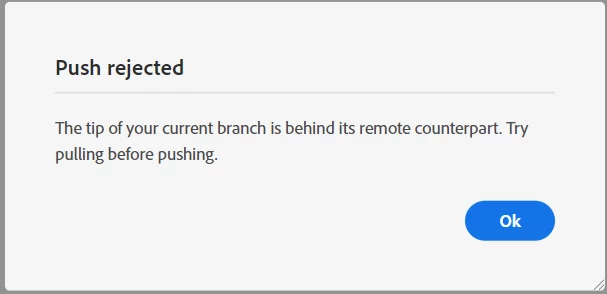
 

When I do pull from collaborate menu. I am not getting any error.

I am stuck at this point.
Can anyone please help me out with what might be the issue here.

    This topic has been closed for replies.

    2 replies

    Inspiring
    May 15, 2024

    When I have gotten this message, it has meant that I am out of sync with the source control documents. Generally, someone other than me updated files, and I failed to pull before working in the file.


    The easiest resolution for us has been to delete local files, reload from the server, and start again. This does mean that you will lose changes that you've made and were unable to push.


    To work around that, save the topic files that you updated in a separate location. Then go through the process of deleting your local files and reloading from the server. After you have reestablished your connection with source control with a clean version, you can import those few files you saved off back into your file - replacing what was downloaded from the server. BEFORE YOU DO THAT confirm that you will not be overriding someone else's work!

    Inspiring
    May 14, 2024

    I heavily recommend using a beginner-friendly tool like Github Desktop for collaboration instead of Robohelp's in-built git integration tool.

    PaiAkshayAuthor
    Participant
    May 14, 2024

    We are using gitlab for source control

    Jeff_Coatsworth
    Community Expert
    Community Expert
    May 14, 2024

    I think you're probably going to have to talk to the RH folks - see https://helpx.adobe.com/contact/enterprise-support.other.html#robohelp for your Adobe Support options. I'd recommend using the tcssup@adobe.com e-mail address as it reaches a team dedicated to Technical Communication Suite products including RoboHelp.