


Inspiring
July 7, 2021
Answered

RoboHelp Displaying an Error

  • July 7, 2021
  • 6 replies
  • 979 views

I'm doing a thorough index edit on my RoboHelp project and, every 10 or so topics, RoboHelp displays that there has been an error, and I should save my work and restart RoboHelp. Here is the error:
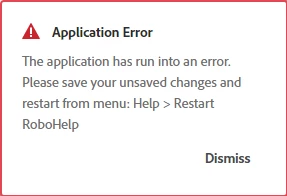


I have upgraded this project to RH 2020 and have installed the latest updates. It works better now then it did in RoboHelp 2019 (or whatever version I had before upgrading).


Has anyone else experienced this problem?


Thank you,

Cindy

 

    This topic has been closed for replies.
    Correct answer Peter Grainge

    Shouldn't happen. Please follow this link to report bugs. https://tracker.adobe.com

    Post the link to your bug report in this thread and others can vote for it. The more people who do so, the higher it gets prioritised.

    ________________________________________________________
    See www.grainge.org for free Authoring and RoboHelp Information

    6 replies

    Peter Grainge
    Community Expert
    Community Expert
    August 2, 2021

    I just got two status change emails. 🙂

    ________________________________________________________
    See www.grainge.org for free Authoring and RoboHelp Information

    Use the menu (bottom right) to mark the Best Answer or Highlight particularly useful replies. Found the answer elsewhere? Share it here.
    Inspiring
    August 10, 2021

    I also just received a status change email, so the non-notification issue has at least been resolved!


    Peter Grainge
    Community Expert
    Community Expert
    July 31, 2021

    @Karin Albrecht I have been advised that this has been fixed. Now waiting to see.

    ________________________________________________________
    See www.grainge.org for free Authoring and RoboHelp Information

    Use the menu (bottom right) to mark the Best Answer or Highlight particularly useful replies. Found the answer elsewhere? Share it here.
    Peter Grainge
    Community Expert
    Community Expert
    July 14, 2021

    The report shows that Adobe responded as below.


    The reason I asked about notifications is simply I have stopped getting them and wanted to ascertain whether it was just me or it is happening to others. As you have not received an email, it seems to be general. 


    You seem to be aware that you need to submit the log requested even though you have not received any email. So far though I cannot see that you have attached that file to the bug report. You don't need an email to do that.


    Does that answer your post?

    ________________________________________________________
    See www.grainge.org for free Authoring and RoboHelp Information

    Use the menu (bottom right) to mark the Best Answer or Highlight particularly useful replies. Found the answer elsewhere? Share it here.
    Inspiring
    July 14, 2021

    Hi, Peter:


    When I didn't get an email about your response to the bug, I went out and checked the bug. That's where I saw the response you copied above.


    I'm working through the help project now to reproduce the error and get the logs.


    Yes, this answers my post.


    Thanks!

    Cindy


    Peter Grainge
    Community Expert
    Community Expert
    July 8, 2021

    I have added a comment. Please let me know if you get a notification from Adobe.

    ________________________________________________________
    See www.grainge.org for free Authoring and RoboHelp Information

    Use the menu (bottom right) to mark the Best Answer or Highlight particularly useful replies. Found the answer elsewhere? Share it here.
    Inspiring
    July 14, 2021

    Peter, 


    I haven't received email for either of the comments in the bug. I have to investigate why.


    I need to reproduce the error and send support my logs.


    Cindy


    Peter Grainge
    Community Expert
    Peter GraingeCommunity ExpertCorrect answer
    Community Expert
    July 8, 2021

    Shouldn't happen. Please follow this link to report bugs. https://tracker.adobe.com

    Post the link to your bug report in this thread and others can vote for it. The more people who do so, the higher it gets prioritised.

    ________________________________________________________
    See www.grainge.org for free Authoring and RoboHelp Information

    Use the menu (bottom right) to mark the Best Answer or Highlight particularly useful replies. Found the answer elsewhere? Share it here.
    Inspiring
    July 8, 2021

    Thank you, Peter!


    Here's the link:

    https://tracker.adobe.com/#/view/RH-9633


    Cindy


    Legend
    July 8, 2021

    Hi Cindy,

    I have come across this same error a couple of times when I opened and closed a greater number of topics or switched between author and code view a lot. I usually just clicked "Dismiss" and continued working 😉 So far, nothing has happened to my project.

    Best regards
    Karin

    Inspiring
    July 8, 2021

    Thank you, Karin!


    This is what I'm also doing. Opening and closing a lot of topics. Not so much looking at the code, but definitely touching a lot of topics.


    I shall move on without as much worry!

    Cindy