
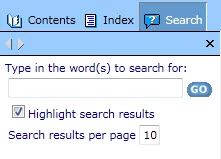
RoboHelp HTML 9 Search Pane Max results controls
RoboHelp HTML 9 with WebHelp as output...
I have a two part question. By default when our users do a search in compile dhelp, they see 10 search results per page. Is there a place in my RoboHelp interface where I can change that to larger number? I have found a line of code in a *.js file where it looks like I could manually change it, but would prefer not to have to do it that route in case that causes unintended hiccups elsewhere.
var nMaxResult = 10 ;
Second part of my question is related to statement in release notes/new features notes for RoboHelp 9 that state users can control the max search results per page on-the-fly as they use the Search pane. This feature only applies to WebHelp or WebHelp Pro and my output is WebHelp. I can see a line of code for that feature in the whfform.htm file but nothing shows up like that in the Search pane within compiled help. Is this a bug or is there a control somewhere in RoboHelp project settings that allows me to enable that option for users? The last 2 lines below would seem to control this area. The Search pane items referenced in first 4 lines do show up ok in my Search pane.
gsTitle = "Type in the word(s) to search for:";
gsTitle = "Type in the word(s) to search for:";
gsHiliteSearchTitle = "Highlight search results";
gsHiliteSearchTitle = "Highlight search results";
gsMaxSearchTitle = "Search results per page" ;
gsMaxSearchTitle = "Search results per page";
Thanks for any insight you can provide,
KF


 AdChoices