
Inspiring
January 3, 2019
Question

RoboHelp HTML error in v11

  • January 3, 2019
  • 1 reply
  • 797 views

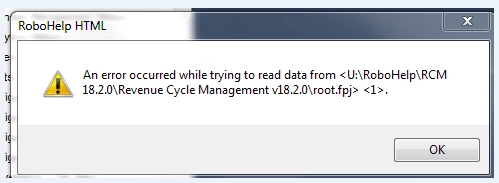
When trying to open or save my Help file I receive the following error. In addition, all my topics are showing under the Broken Links folder and not listed under HTML Files (Topics) folder. I've tried restoring each topic, but it doesn't last. I have no idea how this happened. Any thoughts? I have thousands of topics. Do I need to restore all of them and recompile? When I restore a handful it is not being retained. Thanks.
This topic has been closed for replies.

1 reply

Peter Grainge
Community Expert
Community Expert
January 3, 2019

The first thing I would do is create a backup of where you are. I always recommend creating the backup as a zip file. That prevents you opening it accidentally and working on it before you realise it was the backup. This way you always have a clean backup that can be used to create a new clean copy time after time.

U looks like a network drive and if it is, please don't tell me you have been working that way for a long time without issue. Adobe have always said since that way of working was introduced that it depends on your network. A possibility is something has changed there.

Once you have that backup, delete the project CPD and see if that helps. I doubt it will but with a backup to hand, it can do no harm.

Do you have a backup from before the problem occurred? If you do, create a copy of that and see if that works. Do not try the backup without creating a further copy in case that goes belly up.

Is there any source control involved?

Do you have the updates applied?

Try those things and then post back.


See www.grainge.org for free RoboHelp and Authoring information.

@petergrainge

Use the menu (bottom right) to mark the Best Answer or Highlight particularly useful replies. Found the answer elsewhere? Share it here.
Peter Grainge
Community Expert
Community Expert
January 3, 2019

You could also try this on a backup of the project.

https://www.helpessentials.com/product/missing-topics-fixer/


See www.grainge.org for free RoboHelp and Authoring information.

@petergrainge

Use the menu (bottom right) to mark the Best Answer or Highlight particularly useful replies. Found the answer elsewhere? Share it here.
Inspiring
January 3, 2019

I have a backup. All topics have been restored. I'm going to compile and see what happens. Recently I moved project to U drive because our IT department advised me to do so. Previously I was just working locally and then saving compiled project on server. Hoping our IT department will let me upgrade to newer version of RoboHelp.

Crossing my fingers.