BTW, when attaching screenshots, it's best to use the Camera icon you see in the toolbar when you write your reply.
My guess is that some kind of permission setup has been missed.
It's also hard to know where to start because the author is "remote". Is that VPN? Or Remote Desktop or what?
I'll start with the most obvious.
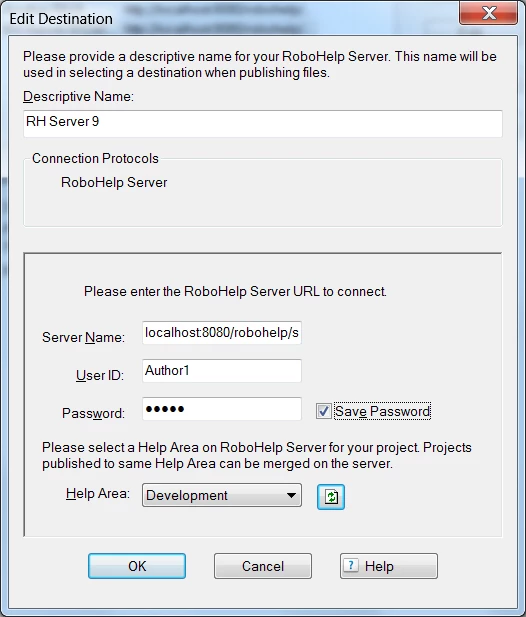
It could simply be that when the author generates the WebHelp Pro SSL, the Edit Destination dialog may be incomplete. I've done this myself when I fill out the info shown in this screenshot, I forget to choose a Help Area or put in a wrong password. So, definitely check this out first.
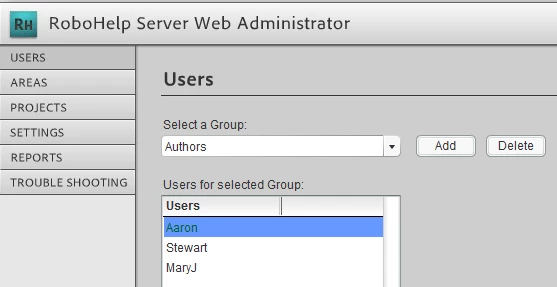
Next, you or your administrator needs to verify the Author's user account, Group and Area are correctly setup.
This screenshot shows that a Group was created (in this case, called Authors) and the individual users were assigned to it.
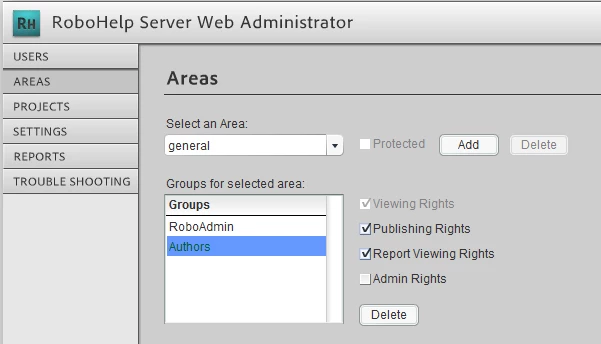
Finally, the Authors group must be assigned to an Area and the Publishing Rights assigned.
You might also look at this thread which discusses similar issues and a solution.
http://forums.adobe.com/message/4162467#4162467
After all that, it could have something to do with the permissions of the remote author to have access to the publishing destination (the machine that has RoboHelp Server) from a remote location and has nothing to do with the RoboHelp side of the permissions!
This is the best I can do from where I sit. Let us know if you solve the issue.
John Daigle
Adobe Certified RoboHelp and Captivate Instructor
Evergreen, Colorado
www.showmethedemo.com

 AdChoices