
Participating Frequently
September 15, 2011
Question

Robohelp - Images appearing as references and not the image

  • September 15, 2011
  • 1 reply
  • 481 views

Hello,

I've recently noticed all the image files in my project manager were showing as an ICON with a 'h' on them.  I look into the root directory in windows explorer, it seems for some reason the images are listed as files without the 'jpg' extension.  Is there anyway to quickly resolve the links so that they are not broken?  The images appear fine in Robohelp, however, they appear broken in the output format

here is what it looks like in Robohelp:
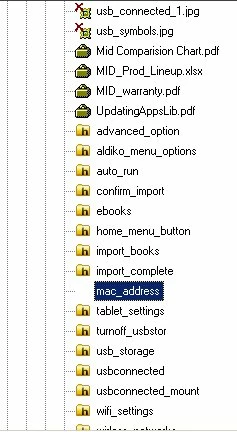
Thanks,

Nathan

This topic has been closed for replies.

1 reply

Peter Grainge
Community Expert
Community Expert
September 15, 2011

I don't know about the H but let's try to fix the images losing their file extension first. Before doing anything, make a backup copy of your project.

There are plenty of freeware apps that will change/add extensions. Try one of those. With the extensions add try opening RoboHelp again. You may then need to close it, delete the CPD file and then open it again.

Please see the sticky topic Before You Post. Knowing what version and edition you are using can affect answers.

I will be moving this topic to the RoboHelp HTML category as the problem is something you are seeing in RoboHelp rather than being only an issue with the output.


See www.grainge.org for RoboHelp and Authoring tips

@petergrainge

Use the menu (bottom right) to mark the Best Answer or Highlight particularly useful replies. Found the answer elsewhere? Share it here.
September 15, 2011

I you can't see file extensions in Windows Explorer, you might want to verify that in your folder options the "Hide extensions for known file types" box is not checked.

To verify this, open Windows Explorer, on the Tools menu, click Folder Options. In the View tab, scroll down about half way until you see "Hide extensions for known file types."

If it's clear, I'd carry on with Peter's suggestions.