


Participating Frequently
October 18, 2021
Question

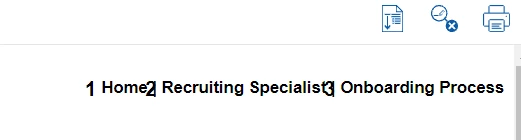
Robohelp is adding numbers to the topic header and can't be edited or deleted.

  • October 18, 2021
  • 9 replies
  • 693 views

RoboHelp is automatically adding numbers to the topic header. I have looked at the master page but can't edit or delete the number. Does anyone know how to fix this? Thanks
    This topic has been closed for replies.

    9 replies

    Legend
    November 9, 2021

    Hi,

    maybe this thread will help you: https://community.adobe.com/t5/robohelp-discussions/rh2019-new-ui-responsive-html-missing-space-in-front-of-breadcrumb-separator/m-p/11254745

    I also have had problems with numbers being added to my breadcrumbs. In my project, this was the case because the ol-style is used for breadcrumbs and I defined the ol-tag to show numbers. I created a separate style for the breadcrumbs-style and now it works.

    Kind regards

    Karin

    Community Expert
    October 28, 2021

    Okay, I'm pretty sure it's the ol>li::before style you can see at the bottom of the right-hand pane.


    Do you know what else you are using that style for? If you aren't using it, you could delete it.


    But if you're not sure whether it's used, then probably the best thing to do is reset it inside the breadcrumbs div. To do that, you need to add the following to your stylesheet. You might need some other tweaks to undo the other properties like width, but give just the below a go and post back if you have further issues.


    div.breadcrumbs ol>li:before {
        content: "";
    }

     (This style says, inside any div called 'breadcrumbs', if there's an ordered list, create an element in front of each list item and set the content of the element to a blank string.)

    Participating Frequently
    November 9, 2021

    Thank you!

    Community Expert
    October 27, 2021

    Okay, I can't see anything likely causing the problem on the ol tag you have selected. Could you take one more screenshot with the li selected please?


    Participant
    October 28, 2021

    Here you go! Hopefully you will see something on this one. Thanks for helping!

    Community Expert
    October 21, 2021

    Sorry, could you please re-take the two screenshots but include the whole developer tools window? I need the Styles panel included so I can see where the selected element is getting its styles from.

    Participant
    October 27, 2021

    Sorry, but my computer has been in IT for repairs. Here are the two screen shots. Thanks for your help.  

    Community Expert
    October 20, 2021

    You said "I think I found where the numbers are coming from", but I'm going to assume you still have unwanted numbers in your breadcrumbs. If you've solved the problem, was it just deleting and re-adding the breadcrumbs that resolved it?


    If you still have the problem, could you post two more screenshots. Click on each of the indicated html tags and take a screenshot. Please post them using the Insert Photos icon in the toolbar as this will place them images inline with text and make it easier for people to see.


    Participating Frequently
    October 21, 2021

    I did try deleting it, but the numbers are there when I re-added the breadcrumb. Here are the two shots. Thanks again for your help!

    Community Expert
    October 19, 2021

    Could you undock the the dev tools - click on the 3 dots and there should be an 'Undock to separate window' option. That should put the styles panel on the left so I can see more information.


    Then, please expand the highlighted section. If you can see something starting with <li inside that section, please click on it and take the screenshot.


    Participating Frequently
    October 20, 2021

    I think I found where the numbers are coming from. I deleted the breadcrumb. When I added the breadcrumb to the header, it had a number. There were no options. I have two screen shots for the breadcrumb...one is the browser as you requested and one is from the RH2020 source view of the masterpage. Again, thank you so much for your help.

    Community Expert
    October 18, 2021

    Is the screenshot of the breadcrumbs? If so, I've seen it in some test projects, but I can't remember what the solution was. If you right-click on the breadcrumbs in your browser, then select Inspect (or Inspect element, or similar), that should give some clues about where the styling is coming from.


    If it all looks like heiroglyphs to you, you can post screenshots here and I can try to figure it out. In the dev tools after you select Inspect, a line will be highlighted in the Elements tab. Click on the li element that's just near it (probably a line or two above) and take a screenshot of the whole dev tools window, and repeat for the ol element. 

    Participating Frequently
    October 19, 2021

    Thank you for you help. Here is a screenshot of the elements tab. Sorry, but it doesn't mean anything to me. I appreciate all of the help you can give. Thanks again!

    Participating Frequently
    October 18, 2021

    Sorry, I am using Version 2020.6.76. This project was updated from the RoboHelp Classic 2019 version. I have had all kinds of issues with the project after I updated it to 2020.


    The topics are not numbered. I am using a browsing sequence that is numbered, but the numbers don't match. I first saw the numbers on the generated version and traced it back to the Master Page. Weird, that I can see the number on the Master Page but cannot delete it or add spacing to it.


    Thanks, 

    Peter Grainge
    Community Expert
    Community Expert
    October 18, 2021

    You haven't said which version of RoboHelp you are using. Please always start a thread with this information.

    • Please go to Help > About and include the full version number.
    • If you are using 2019 also state whether it is 2019 Classic or 2019 New UI.


    That suggests your topics have numbering applied to them.

    ________________________________________________________
    See www.grainge.org for free Authoring and RoboHelp Information

    Use the menu (bottom right) to mark the Best Answer or Highlight particularly useful replies. Found the answer elsewhere? Share it here.