
Texas Techwriter
Inspiring
July 9, 2020
Question

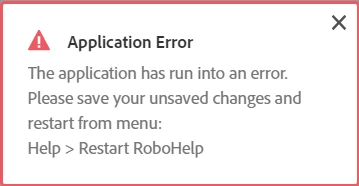
RoboHelp Reimagined keeps giving Application error message when opening

  • July 9, 2020
  • 9 replies
  • 213 views

RoboHelp Reimagined keeps giving Application error message when opening. If I restart Robohelp as recommended, it keeps giving the message.



This topic has been closed for replies.

9 replies

Texas Techwriter
Inspiring
August 25, 2020

They also installed a new version, RoboHelp 2020.0. 

Texas Techwriter
Inspiring
August 3, 2020

They were not specific, but I think it was a registry issue.

Peter Grainge
Community Expert
Community Expert
August 3, 2020

Do you know in broad terms what they did? A reinstall, change a registry entry or suchlike?


Use the menu (bottom right) to mark the Best Answer or Highlight particularly useful replies. Found the answer elsewhere? Share it here.
Texas Techwriter
Inspiring
August 3, 2020

This issue was solved by Adobe Tech Support. The user is not able to solve it so I would suggest that anyone with a similar problem just go directly to Adobe.

Jeff_Coatsworth
Community Expert
Community Expert
July 10, 2020

Well, let's just fix that - unmarked as Correct!

Peter Grainge
Community Expert
Community Expert
July 10, 2020

You have marked your post as a Correct Answer. How is it an answer when it doesn't tell anyone how to fix the problem?


Use the menu (bottom right) to mark the Best Answer or Highlight particularly useful replies. Found the answer elsewhere? Share it here.
Peter Grainge
Community Expert
Community Expert
July 10, 2020

Support should not be referring to the New UI as RoboHelp Reimagined. I will take that up with my contacts. As I said, it is the name of one of the sample projects.


I'm not clear on how reporting the issue without a solution helps anyone else. Is it that you will be posting that when you have a solution?


I've seen people have this problem with a specific project but not all projects. Are you including the sample project RoboHelp Reimagined in the projects that have this problem? If that gives you the same problem it has to be an installation or environment issue so try that and post back.


Was RoboHelp installed with admin rights? That's essential.


What operating system do you have?


Let us know about RoboHelp Reimagined and the questions above so that we can get this sorted.


Use the menu (bottom right) to mark the Best Answer or Highlight particularly useful replies. Found the answer elsewhere? Share it here.
Texas Techwriter
Inspiring
July 10, 2020

Adobe support refers to their new applications as RoboHelp Classic 2019 and RoboHelp 2019 Reimagined. RoboHelp 2019 has the new UI.

Every time I delete a topic or rearrange the TOC I get this error message "Application Error". This happens with all projects. The Layout, Search, and Publish do not display when a Preset is selected. 

I have already contacted Adobe Support for this issue. I put this information in the forum to help anyone who is having the same problems. 

Peter Grainge
Community Expert
Community Expert
July 9, 2020

RoboHelp Reimagined is the name of a sample project. You are using RoboHelp New UI.


Try opening a different project. What happens then?


Use the menu (bottom right) to mark the Best Answer or Highlight particularly useful replies. Found the answer elsewhere? Share it here.