


RoboHelp reports valid Variable Sets in Output Presets as broken links
I am using RoboHelp 2026.02.0313 on Windows 11 and am seeing what appears to be a false broken-link report for Variable Sets assigned to output presets.
Issue
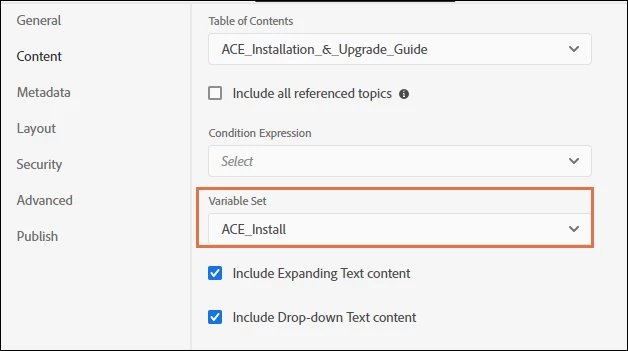
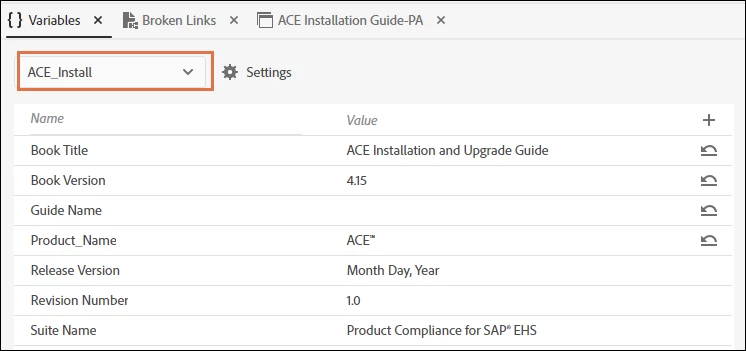
I have several Variable Sets defined in Default.var and assigned to PDF output presets. The Variable Sets work correctly:
- They appear correctly in the Variables editor.
- They can be selected from the Variable Set dropdown in an output preset.
- The output generates successfully.
- The generated output uses the correct values from the selected Variable Set.
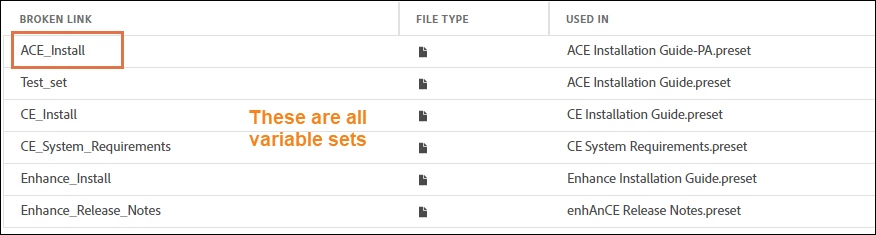
However, RoboHelp reports the Variable Set assigned to each output preset as a broken link.
Background
These projects were initially generated programmatically as part of a FrameMaker-to-RoboHelp conversion process, so I initially suspected that the generated files were missing something RoboHelp expected.
The original Default.var did not contain a defaultVarSet. I corrected that so the file now has a structure like:
<variables>
  <variableset id="defaultVarSet">
    <variable id="Book Title">Book Title</variable>
    <variable id="Guide Name">Guide Name</variable>
    ...
  </variableset>

  <variableset id="ACE_Install">
    <variable id="Book Title">ACE Installation and Upgrade Guide</variable>
    ...
  </variableset>
</variables>
Adding defaultVarSet resolved one problem: the variables and Variable Sets are now displayed correctly in RoboHelp's Variables interface.
It did not resolve the broken-link report.
Output preset reference
The generated output preset referenced the Variable Set as:
<variable>
  <name>ACE_Install</name>
  <path>ACE_Install</path>
</variable>
I initially suspected that <path> needed to reference Default.var, so I tried variations such as Default.var#ACE_Install and relative paths using ../ and ../../. None resolved the broken-link report.
I then tested this entirely through the RoboHelp UI.
I removed the Variable Set from the output preset in RoboHelp and saved the preset. RoboHelp removed the <variable> element from the preset XML.
I then selected ACE_Install again using RoboHelp's Variable Set dropdown and saved the preset.
RoboHelp itself recreated exactly the same XML:
<variable>
  <name>ACE_Install</name>
  <path>ACE_Install</path>
</variable>
So the programmatically generated preset appears to be using the same format that RoboHelp itself uses.
Test with a completely new Variable Set
To eliminate the possibility that the programmatically created Variable Sets themselves were the problem, I performed another test:
- Created a brand-new Variable Set named
Test Setmanually using the RoboHelp UI. - Assigned
Test Setto the existing output preset using the RoboHelp UI. - Saved the preset.
- Ran the broken-links report again.
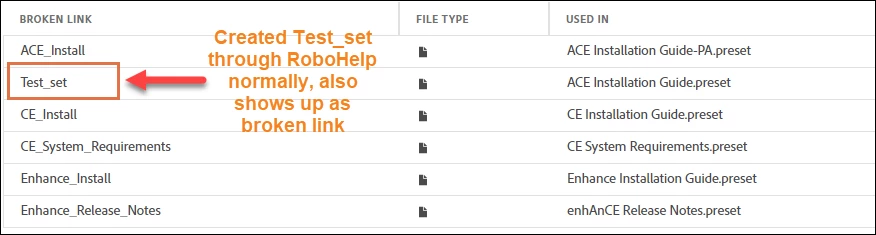
The manually created Test Set was also reported as a broken link.
At this point, both the Variable Set and its assignment to the output preset had been created entirely within RoboHelp, with no programmatically generated XML involved.
Current behavior
The result is therefore:
- Variable Set created in RoboHelp: works
- Variable Set visible in Variables editor: works
- Variable Set selectable in output preset: works
- Variable values used during output generation: works
- Output generation: works
- Variable Set reference in Broken Links report: reported as broken
Has anyone else seen this behavior in RoboHelp 2026?
Is there another project reference or setting that the Broken Links report expects for Variable Sets assigned to output presets, or is this a false positive in the Broken Links report?
Environment:
RoboHelp 2026.02.0313
Windows 11
 AdChoices