


Inspiring
September 19, 2022
Answered

Robohelp Review

  • September 19, 2022
  • 2 replies
  • 269 views

Hi Team, 

I have a query on Robohelp Review. If the reviewer added a comment on a topic and the writer had resolved the comment. After the writer incorporates all the comments, how will the writer send the topic for review with the existing comments? 

Ex: I received comments from my reviewers through Robohelp Review feature.
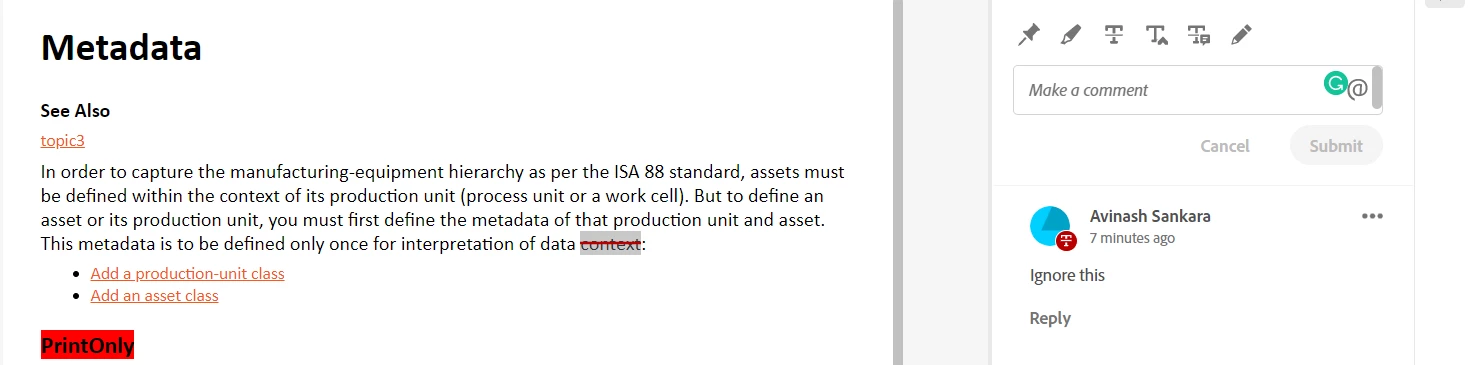
I have incorporated all the comments.
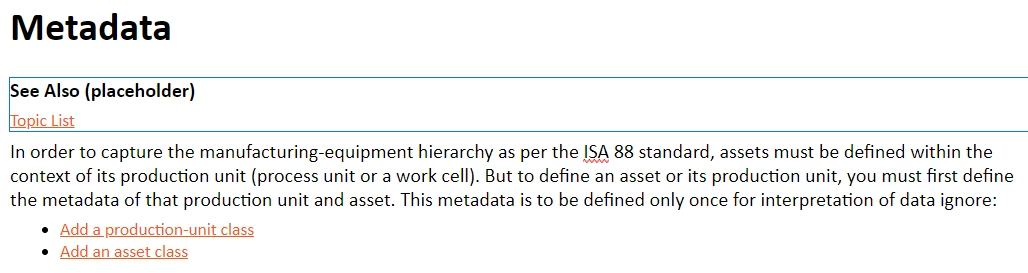
 

How should I send the topic for review with the reviewer's comments as well as the updated doc?

Can I use the existing review link for the reviewing process? I want the reviewer's comments as well as the newly updated document to appear. 


Pretty confused with the review feature. 


Thanks,

Avinash S

    This topic has been closed for replies.
    Correct answer Peter Grainge

    Do you mean restarting the review again? Yes


    If I do that, the reviewer's comments won't be available in the newly created reviewer. Correct


    Is there any way to keep both the comments and the updated file in a single review? No. The review takes a snapshot of the topic at the time.

    It's also possible you may have made other edits meantime so using the original state of the topic wouldn't work. You may have sent a different combination of topics to another reviewer. Various reasons why a snapshot is taken.

    ________________________________________________________

    My site www.grainge.org includes many free Authoring and RoboHelp resources that may be of help.


    2 replies

    Peter Grainge
    Community Expert
    Peter GraingeCommunity ExpertCorrect answer
    Community Expert
    September 19, 2022

    Do you mean restarting the review again? Yes


    If I do that, the reviewer's comments won't be available in the newly created reviewer. Correct


    Is there any way to keep both the comments and the updated file in a single review? No. The review takes a snapshot of the topic at the time.

    It's also possible you may have made other edits meantime so using the original state of the topic wouldn't work. You may have sent a different combination of topics to another reviewer. Various reasons why a snapshot is taken.

    ________________________________________________________

    My site www.grainge.org includes many free Authoring and RoboHelp resources that may be of help.


    Use the menu (bottom right) to mark the Best Answer or Highlight particularly useful replies. Found the answer elsewhere? Share it here.
    Peter Grainge
    Community Expert
    Community Expert
    September 19, 2022

    You might want to check with Support but I don't think that's the way it works. Once the reviewer has come back and you have incorporated the responses, you start again.


    You could create a style such as p.authornotes with a bright coloured font, then where you make changes you add a comment such as "Changed as suggested". You can see such a style in the About RoboHelp sample project that you will find in Documents > My RoboHelp Projects.


    See https://helpx.adobe.com/contact/enterprise-support.other.html#robohelp for your Adobe Support options. The email link tcssup@adobe.com is recommended as it reaches a team dedicated to Technical Communication Suite products including RoboHelp. 

    ________________________________________________________

    My site www.grainge.org includes many free Authoring and RoboHelp resources that may be of help.


    Use the menu (bottom right) to mark the Best Answer or Highlight particularly useful replies. Found the answer elsewhere? Share it here.
    Inspiring
    September 19, 2022

    Hi Peter,

    Thanks for the response. I didn't understand when you said: "you start again". Do you mean restarting the review again?

    If I do that, the reviewer's comments won't be available in the newly created reviewer. 

    Is there any way to keep both the comments and the updated file in a single review?