
Inspiring
March 20, 2018
Answered

RoboHelp Server 9.0 Publishing issues

  • March 20, 2018
  • 1 reply
  • 596 views

Okay..Here comes my publishing issue.

  • I am trying to publish through Robohelp 2017. ...using WebHelp Pro and Robohelp Server 9.0.

  • Once the WebHelp Pro wizard opens and I go to Next and then fill in the Publish details, such as Server URL, username , password.

  • The Help Area dropdown does not show anything. And shows that it is not able to connect to the server.. I have attached the screenshot.
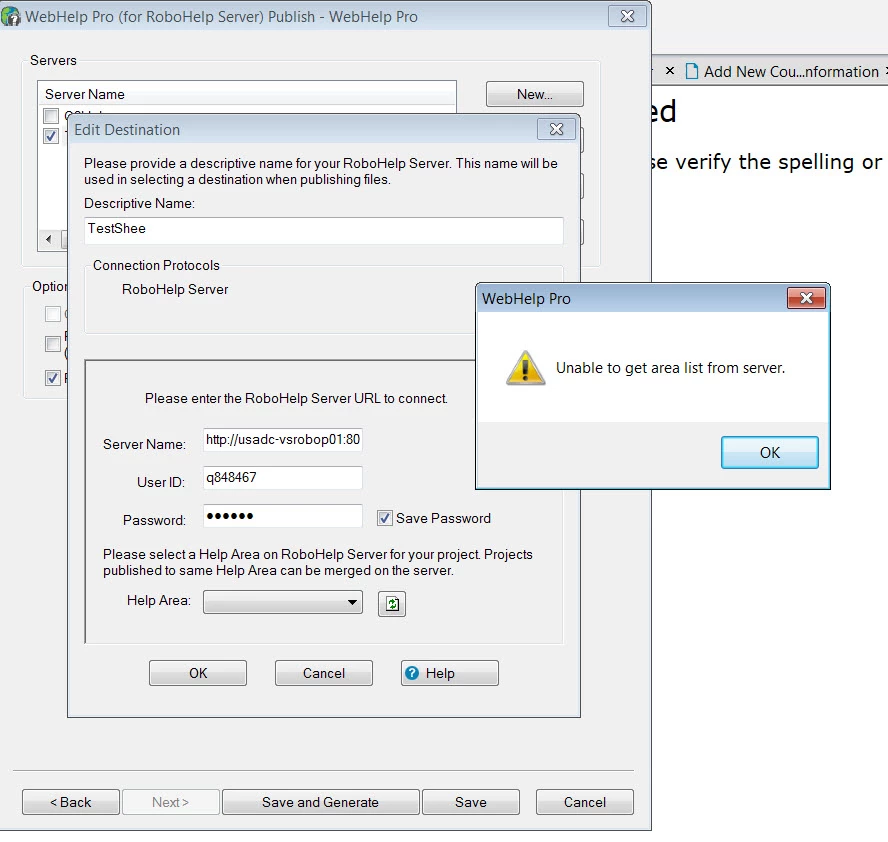
  • So, in short, the issue is that Although I am able to login to the Roboserver, The Robohelp 2017 is not able to connect to the server.

Note: I was able to see the Areas earlier. And I was able to publish smoothly earlier. All of a sudden this issue came.

This topic has been closed for replies.
Correct answer sia09

Thanks...The issue is resolved now with the hlp of the IT executive in my company.

The resolution was simple. I did not realize the URL name of the server I was putting in Robohelp Publish wizard was not correct.

For everybody's information, the server name URL should be

http://<applicationname>:8080/robohelp/server

1 reply

johndaigle
Legend
March 20, 2018

Hi, sia09.

By chance did you click the "refresh" icon to the right of the Area field?

Also, under your screenshots I see an additional server setting. Have you checked the one you want?
Try logging on to the Web Admin application and if that is successful it would appear you have a good connection. Then, create a new custom Area (besides the default "general").

Then, go back to the Rh publishing dialog and click the refresh icon and see if the new Area appears.

Thanks

John Daigle

Adobe Certified RoboHelp and Captivate Instructor

Evergreen, Colorado

www.showmethedemo.com

John DaigleAdobe Certified RoboHelp and Captivate InstructorNewport, Oregon
sia09Author
Inspiring
March 20, 2018

Thanks but I have already done all that and still the Area does not show anything....it was showing earlier but I don't know what happnd now.

Have clicked Refreshed several times

I am able to login in the server but Robohelp is not

I have checked the server setting

I have tried creating a new Area

sia09AuthorCorrect answer
Inspiring
March 21, 2018

Thanks...The issue is resolved now with the hlp of the IT executive in my company.

The resolution was simple. I did not realize the URL name of the server I was putting in Robohelp Publish wizard was not correct.

For everybody's information, the server name URL should be

http://<applicationname>:8080/robohelp/server