
Participant
August 26, 2013
Question

Robohelp, SharePoint, and .cpd

  • August 26, 2013
  • 1 reply
  • 1275 views

I recently added a Robohelp 10 project to SharePoint source control. Now, when I attempt open the xpj from SharePoint, I recieve the following error and I cannot open the project:
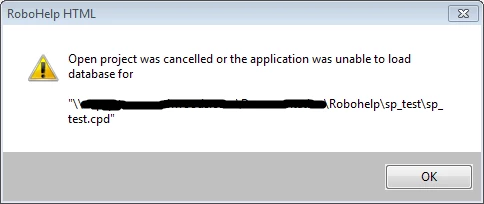
I can still successfully open the project from my local machine, and the source control appears to work, but my team members need to access the project from SharePoint. How do I resolve the cpd error?

This topic has been closed for replies.

1 reply

RoboColum_n_
Legend
August 27, 2013

I personally would not be adding the .cpd file to source control. I'd also ensure that you have the option to rebuild the .cpd file when you open the project selected (Tools > Options).

Participant
August 27, 2013

How do I remove the cpd file? Or, how do I avoid adding it in the first place? When I delete the SharePoint cpd file, it's automatically rebuilt when I attempt to reopen the project, and I get the error message.

When I originally added the project to source control, I didn't have the option to exclude certain files. All files associated with the project are automatically added.

RoboColum_n_
Legend
August 28, 2013

If you click Tools > Options and select the "Clear project cache (.cpd) before opening project" option, the CPD file will be deleted and rebuilt each time you open a project. See if that solves the issue.

If it doesn't, you'll need to ensure the file is not added to source control. I do not use SharePoint for this purpose but all other source control applications give you a method of choosing what files to include/exclude. I'd be suprised if SharePoint included ALL your project files by default.