
Robohelp - TFS Mapping issue for different versions
Hi,
I'm using Adobe Robohelp 9 with Team Foundation Server 2012 on Windows 7 - 64 bit. I've also installed Microsoft Visual Studio Team Foundation Server 2012 MSSCCI Provider. I've mapped all the project folders on my machine. We create HTML help (.chm) for our application.
I have different versions for each module of our entire product on Team Foundation Server 2012 (As we have multiple modules in our product), for example x+1, x+2, x+3 and so on.
Each module has different Robohelp projects for every version/branch. This means, if the Online help for any module from any version is changed, we update it in the respective version of the Online help project.
When we move on to the next version, due to binary files, the next version contains the same path and properties of previous version. We need to have different project for single module for the next version. For this, I have changed the TFS project path of every .xpj project for every version. For example, if I'm working on version x+2, then I've changed the TFS project path from x+1 to x+2 manually on x+2 version/branch and then started working on it.
As these Robohelp projects (for each module) are mapped to my local folder on C drive, it shows a single workspace mapped with same path on my machine. This should be the ideal condition for my all projects as follows:
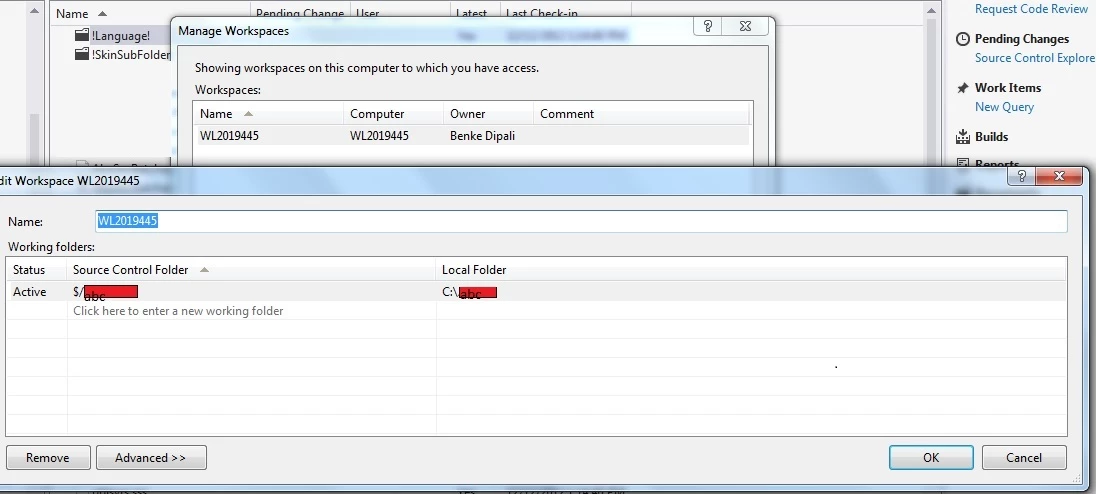
But sometimes when I try to update any file from version x+2 and then check-in my changes, the changes are getting checked-in to the previous version, i.e. x+1. And if I see the workspace of the x+1 version, it shows one more wrong workspace added below the correct one. This new workspace contains the Source control folder path of x+1 version and the Local folder path of x+2 version. That means, my robohelp project folder of x+2 version from my local drive is getting mapped to TFS folder of version x+1. That is why all the changes done in Robohelp project files from x+2 version are going in to x+1 version.
The strange here is when I try to check-in my changes in x+2, it shows the correct path of x+2 version. But they all go to x+1 version, which should not happen.
If anyone can help me in this problem, it would be a great help!
Thanks in advance and waiting for solution,
Dipali


 AdChoices