Inspiring
May 3, 2013
Answered

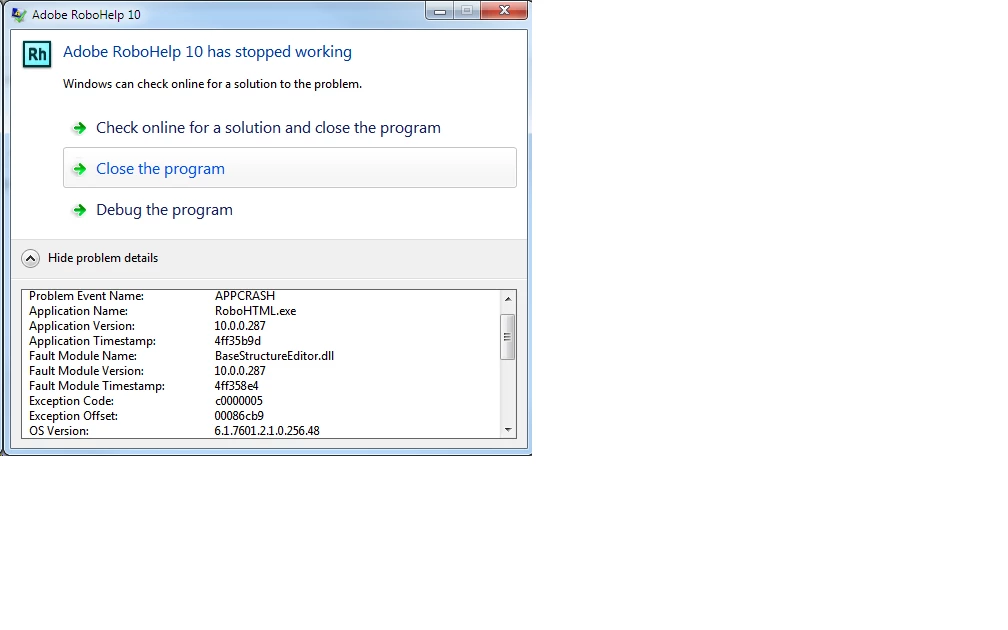
RoboHTML.exe exits with exception

  • May 3, 2013
  • 1 reply
  • 1991 views

I've just installed RoboHelp Office V10. Everything seems fine except for one problem. If I try to generate printed documentation, then RoBoHTML.exe exits with an exception.

I have Microsoft Office 2010 installed also.

Any idea who this should be reported to and how?

Anyone seen anything similar, and have a fix?

TIA

Mick Mathers

    This topic has been closed for replies.
    Correct answer Peter Grainge

    Yes, I can see the logo. I came across this link when reading the Adobe web site about activation problems, and during an online chat with Adobe techical staff.

    Yet the "Deactivate" menu option is still greyed.

    I tried to activate onlne connected to our corperate network with firewall and proxy with no success. Then I connected to a public network we provide for our customers. Still no success.

    The activation dialog said it couldn't connect to the internet on both senario. Reading more on the Adobe web site there was some wittering about clocks not being the same. There was no reason why this could be a problem, or how it should be resolved.

    Sorry for keeping on about this, but it gets me to a point where I bang my head on my desk.


    Re the Normal.dot side of things, search the forum as this has been covered with solutions that people have found. Sorry I cannot look right now.

    As to the activation, that is something that you will need to involve your IT people in. Adobe support for installation issues is free, make sure you follow the RoboHelp prompts to get a quicker response.


    See www.grainge.org for RoboHelp and Authoring tips

    @petergrainge

    1 reply

    Peter Grainge
    Community Expert
    Community Expert
    May 3, 2013

    First thing to do is try the same exercise with one of the supplied sample projects. Click Open on the RoboHelp Starter page and then click Samples in the ribbon on the left.

    You need to establish whether it is a project issue or an installation issue.


    See www.grainge.org for RoboHelp and Authoring tips

    @petergrainge

    Use the menu (bottom right) to mark the Best Answer or Highlight particularly useful replies. Found the answer elsewhere? Share it here.
    Inspiring
    May 3, 2013

    The first thing I did was try the salesbuilder sample. This execption occurs for that project.

    Mick Mathers

    Peter Grainge
    Community Expert
    Community Expert
    May 3, 2013

    Was Rh installed with Admin rights is the first thing to check then?

    Do you have the PDF option ticked as well, try without?

    If those fail, I think I would be inclined to uninstall and reinstall. Make sure you also install the 10.0.1 patch.

    I am assuming that Word 2010 has been used as if not, there should be a message rather than a crash.

    If you need to post back, what's the operating system?


    See www.grainge.org for RoboHelp and Authoring tips

    @petergrainge

    Use the menu (bottom right) to mark the Best Answer or Highlight particularly useful replies. Found the answer elsewhere? Share it here.