
Participant
December 11, 2017
Answered

Roboscreen Capture doesn't work anymore ?

  • December 11, 2017
  • 1 reply
  • 1028 views

Hello,

We had to delete entirely Robohelp and to reinstall it. We deleted it from the Creative Commons window by pressing the Desintall button. Now, RoboScreen Capture doesn’t work at all. A window displaying Error in launching RoboScreen Capture appears.

What can I do to fix this?

Thanks.
This topic has been closed for replies.
Correct answer Captiv8r

Hi there

Likely it is still there and will still work. It's just a matter of finding the darn thing.

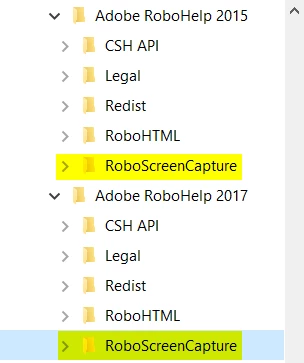
If you right-click the shortcut you are using to open RoboHelp, you should be able to open the file location. And that should show RoboHelp installed inside a folder named RoboHTML.

And if you go up one folder level, you should see a folder named RoboScreenCapture.

Inside that folder you should find the file named RoboScreenCapture.exe

Cheers... Rick

1 reply

Peter Grainge
Community Expert
Community Expert
December 11, 2017

Egh?

Creative Commons window?

Guessing this is linked to your other post.

Use the menu (bottom right) to mark the Best Answer or Highlight particularly useful replies. Found the answer elsewhere? Share it here.
Captiv8r
Captiv8rCorrect answer
Legend
December 11, 2017

Hi there

Likely it is still there and will still work. It's just a matter of finding the darn thing.

If you right-click the shortcut you are using to open RoboHelp, you should be able to open the file location. And that should show RoboHelp installed inside a folder named RoboHTML.

And if you go up one folder level, you should see a folder named RoboScreenCapture.

Inside that folder you should find the file named RoboScreenCapture.exe

Cheers... Rick

johnvarvatsis
Inspiring
November 29, 2019

Hi


I'd just like to add, the same thing happened to me recently. After re-installing Robohelp 2017 and experiencing the same problem, I installed updates and after re-starting RoboHelp, RoboScreen Capture worked just fine 🙂