
Rolling over image/link in CHM displays image errror indicator
Using Windows XP / RH7.
Hello. A co-worker needs to supply the same project in both CHM and Webhelp versions. She has recently worked with our design guy to introduce some new graphics and as part of that he did some css work and added some javascript. Neither my co-worker or myself are familiar with Java.
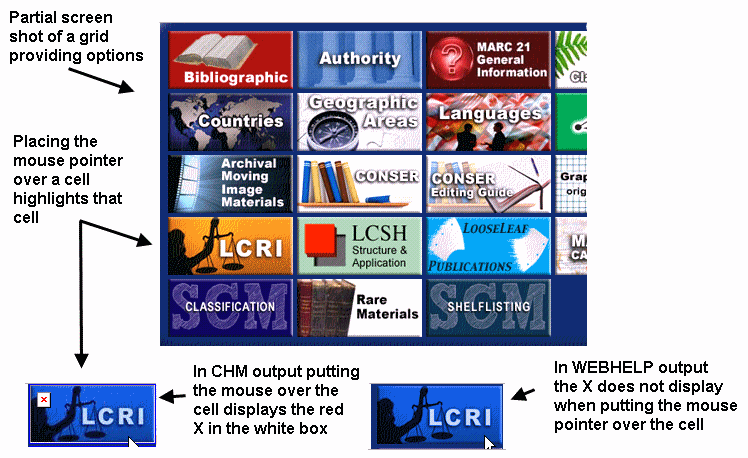
One of her topics includes a graphic menu that is set up as a table with an image/link in each cell. Mousing over each graphic pulls a second image file that displays the same image but with a tint to it, basically conveying the idea that this image is active, awaiting your click.
In the CHM output when you place the mouse pointer over one of the cell graphics the tinted image displays, but it also displays a small square with a red X in it, which has always meant to me that the image wasn't found or some error is occurring.
In the WEBHELP output this problem does not happen. In both cases the link works and when clicked takes you to the intended target.
The screen shot below provides an illustration of what is happening.
Below the screen shot is the code that is displayed when I mouse over a cell and then right-click and select "Inspect Element" in Firebug.
Since I am not conversant in java I don't really know what other evidence I should be providing here, but I'm hoping this is at least a start. I'm also hoping that the fact that the problem only surfaces in the CHM may make it evident to a more knowledgeable user what could be going on.
Thanks in advance for any help you can provide.
Joe
<tr>
<td style="padding: 1px;">
<implicit_p>
<a href="mergedProjects/lcri/lcri/Contents.htm">
<img id="Image16" height="58" border="1" width="125" style="width: 125px; height: 58px; border-width: 1px; border-style: solid;" onmouseout="MM_swapImgRestore()" onmouseover="MM_swapImage('Image16','','rollover/LRCI.jpg',1)" alt="none" src="http://www.itsmarc.com/crsbeta2/images/LRCI.jpg">
</a>
</implicit_p>
 AdChoices