


Participant
November 7, 2024
Question

Rowspan generates an error during generation and is not displayed in the PDF output

  • November 7, 2024
  • 4 replies
  • 433 views

When I create a table with a rowspan="2", I receive an error message in the log (Incorrect link). In addition, the chapter is not displayed in the PDF output.
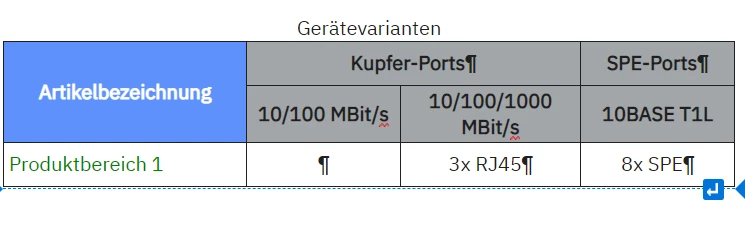
<table class="GreyHead">
    <caption>Gerätevarianten</caption>
    <colgroup>
      <col width="20%" />
      <col width="15%" />
      <col width="15%" />
      <col width="15%" />
    </colgroup>
    <thead>
      <tr>
        <th colspan="1" rowspan="2"><p>Artikelbezeichnung</p></th>
        
        <th colspan="2" rowspan="1">
          <p class="centered">Kupfer-Ports</p>
        </th>
        <th>
          <p class="centered">SPE-Ports</p>
        </th>
      </tr>
      <tr>
        <th>10/100 MBit/s</th>
        <th>10/100/1000 MBit/s</th>
        <th>10BASE T1L</th>
      </tr>
    </thead>
    <tbody>
      <tr>
        <td><span data-keyref="Produktbereich 1">Produktbereich 1</span></td>
        <td>
          <p class="centered"> </p>
        </td>
        <td>
          <p class="centered">3x RJ45</p>
        </td>
        <td>
          <p class="centered">8x SPE</p>
        </td>
      </tr>
    </tbody>
  </table>

If I remove the rowspan, everything is OK.

    This topic has been closed for replies.

    4 replies

    Jeff_Coatsworth
    Community Expert
    Community Expert
    November 12, 2024

    Where's the link in there? I think I missed it in that code...

    Peter Grainge
    Community Expert
    Community Expert
    November 12, 2024

    Try fixing the issue that gave the warning first.

    ________________________________________________________

    My site www.grainge.org includes many free Authoring and RoboHelp resources that may be of help.


    Use menu (bottom right) to mark as Best Answer or to Highlight particularly useful replies. Found the answer elsewhere? Share it here.
    Inspiring
    November 12, 2024

    Not sure what to tell you, the PDF output works fine when I copied the HTML:

    The only difference is that I do not have your stylesheet. If your publication attempt succeeds without the stylesheet, the problem probably lies with either your 'GreyHead' or 'centered' class.

    Participant
    November 12, 2024

    If I remove "GreyHead" and "Centered", the chapter with the table still does not appear in the PDF output.
    Are you also using RoboHelp version 2022.5.28?

    Jeff_Coatsworth
    Community Expert
    Community Expert
    November 7, 2024

    As a test, have you tried generating Responsive HTML5 output to see if the same error happens or not? As for the not appearing, you did remember to include it in the TOC, right?

    Participant
    November 7, 2024

    Frameless or HTML5 output work without any problems.
    The file was always included in the table of contents. I have only made changes to the table.

    I use RoboHelp Version 2022.5.28
    Jeff_Coatsworth
    Community Expert
    Community Expert
    November 8, 2024

    In that case, I suggest you contact the RH folks - see https://helpx.adobe.com/contact/enterprise-support.other.html#robohelp for your Adobe Support options. I'd recommend using the tcssup@adobe.com e-mail address as it reaches a team dedicated to Technical Communication Suite products including RoboHelp.