
Participating Frequently
September 7, 2017
Answered

Runtime Error in RH 2015 when Inserting Images

  • September 7, 2017
  • 2 replies
  • 644 views

This issue just started today. Each time I try to insert an image in an existing RoboHelp project, I get the following error:
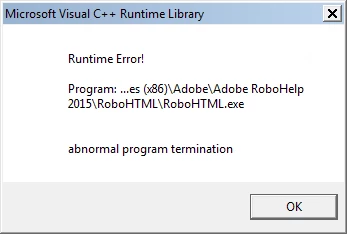
Then, of course, the project completely crashes. To give some more information, this is an RH project that was recovered from one that became lost due to a previous laptop crashing. The project has been working fine along with publishing and inserting images until today. I use SnagIt to capture images and save them right within the RoboHelp project's folder and I set the DPI on images to 300 so they scale appropriately within the project. The RoboHelp project is saved on a folder on my company's network. The recovered project contained several images from the old project which I had to change out and I kept the same naming convention on some.

The error is not consistent but happens the majority of the time. It displays when adding images and sometimes even when just opening the project.

Any help would be greatly appreciated as I'm on a tight deadline to get a major project done. Thanks in advance!

Best Regards,

Steven

This topic has been closed for replies.
Correct answer Jeff_Coatsworth

With recent releases of RH Adobe has said that running projects off of network locations is ok, but everyone's network is different and issues may arise. That's why us "old-timers" stick with local copies of projects on "short" paths like c:\projects\project_name\. Of course all this changes when you have multiple authors at play - then you need to invest in source control so that topics can checked out/in when authors work on them. The .cpd file is just an Access file that keeps track of parts of your project - it's safe to delete it because RH recreates each time if it's missing.

2 replies

Captiv8r
Legend
September 8, 2017

Hi there

If you open a different project and try to insert an image, does the same thing happen there?

If it does, it would seem that the issue is with RoboHelp or possibly with the image. To rule out the image, I'd try inserting an image from the RoboHelp Gallery.

Also, I'm very unclear as to why you feel you need images that are 300 DPI. Most images used for screen display are about 1/3 of that.

Check out this link for more on that.

I believe a 300 DPI image will be substantially larger than the normal screen image. So that may be a factor.

Cheers... Rick

sharris25Author
Participating Frequently
September 8, 2017

Rick,

I began using 300 DPI for scaling purposes. I use this so that when I shrink an image down in RoboHelp, the image doesn't become skewed. When I insert a 300 DPI image, I don't leave it in its original size but rather shrink it down to a size I feel is appropriate for the publishing the webhelp. If you think 300 dpi images, even when shrunk down, is causing the issue, I can try another route.

Jeff_Coatsworth
Community Expert
Community Expert
September 8, 2017

First I would make sure that RH2015 is completely up to date. Then I would zip up a copy of the project off the network & put it on my local c:\ drive in someplace with a short pathname. Then I would delete the .cpd file & try opening it again.

Peter Grainge
Community Expert
Community Expert
September 8, 2017

Also try in one of the sample projects.

Use the menu (bottom right) to mark the Best Answer or Highlight particularly useful replies. Found the answer elsewhere? Share it here.