
October 12, 2011
Question

Runtime Error - Microsoft Visual C++

  • October 12, 2011
  • 1 reply
  • 4624 views

Guys,

Trying to install Robohelp 9.0 for our users.  Robohelp works fine, its just Robohelp for Word does not work at all and throws up an error every single time.  We have applied the 9.0.1 patch also. These are Dell 980 boxes with Windows 7 64bit - Office 2007. 

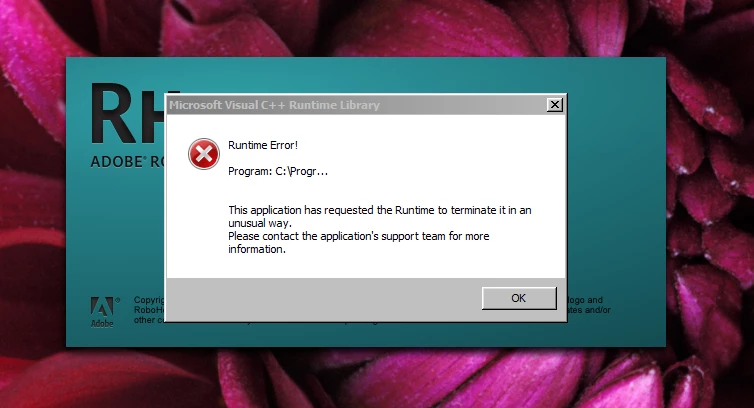
We are admins and have installed, and Robohelp for Word works fine for us admins.  However, when a user logs in and launches Robohelp for Word, they always get a "microsoft visual C++ runtime library error".  Every single time. 

We have uninstalled, made the user an admin, logged in as them and installed only to get the same result.

Is it something in the appdata folder?  Some kind of permissions somewhere since us admins can launch Robohelp for Word, but a general user (even with admin priv's) cannot?

Thanks for any info!
This topic has been closed for replies.

1 reply

Peter Grainge
Community Expert
Community Expert
October 12, 2011

I have seen that but probably over 10 years ago so forgive me if I don't recall the exact details. At that time I know much less about the intricacies of RoboHelp and believe we had to uninstall both RoboHelp and Word and then reinstall Word first then RoboHelp. That of course was with much older versions of both applications.

What I would try now is giving one user a new profile with admin rights and without deleting the old one, at this stage. See if that alone helps.

If that alone does fix it then it's your call as to whether to change the user to the new profile with the attendant downside or try the next option.

The next option is to remove both apps and consider using RevoUninstaller (Google it) with the Advanced options. Make sure you only delete registry stuff shown in bold text. You will see what I mean and as admins you will find it is a straightforward app. It is free and we have seen a number of issues fixed using that tool. It is of course at your risk. I keep the portable version on a flash drive.

Beyond that it's likely a call to Tech Support and as an installation problem it is free.

I would appreciate you posting back the fix that works.


See www.grainge.org for RoboHelp and Authoring tips

@petergrainge

Use the menu (bottom right) to mark the Best Answer or Highlight particularly useful replies. Found the answer elsewhere? Share it here.
October 12, 2011

Thanks for the reply. 

I forgot to add that to my original post.  Yesterday, we created the user a new profile and gave her admin rights and under her profile we installed Robohelp.  Still, the same error.  But again, when us real admins login it works?! 

Unfortunately we don't have RevoUninstaller on our approved software list, so we can't install. 

Guess I will be making a call to Adobe.

Peter Grainge
Community Expert
Community Expert
October 12, 2011

I found this similar report.

http://forums.adobe.com/message/1946812#1946812

Worth checking the permissions have filtered through?


See www.grainge.org for RoboHelp and Authoring tips

@petergrainge

Use the menu (bottom right) to mark the Best Answer or Highlight particularly useful replies. Found the answer elsewhere? Share it here.