


Known Participant
Sep 8, 2020 5:50 PM UTC
Answered

Script error

  • Our programmer is telling me that he is getting the following script error when trying to test out the final project files.
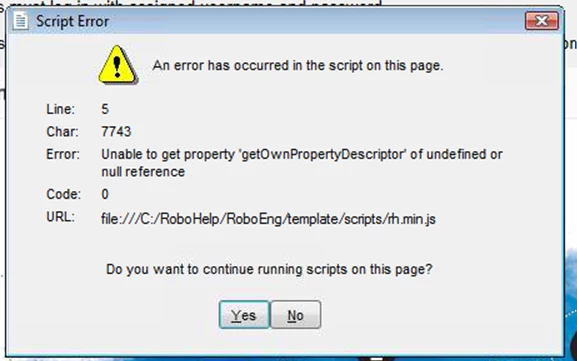
 

When I test the output myself, I am not getting the script error. I don't know for sure what I am looking for in the code. Any help is greatly appreciated.

This is a RH2020 project.

 

    This topic is closed to new replies. Start a new post to keep the conversation going.
    Jeff_Coatsworth
    Jeff_CoatsworthCorrect answer
    Community Expert
    Sep 9, 2020 5:29 PM UTC

    IE7 ?!? - there's your answer - looking at IE7 vs IE11 on https://html5test.com/compare/browser/ie-7/ie-11.html - there no way it's going to handle that!

    15 replies

    Jeff_Coatsworth
    Community Expert
    Jeff_CoatsworthCommunity ExpertCorrect answer
    Community Expert
    Sep 9, 2020 5:29 PM UTC

    IE7 ?!? - there's your answer - looking at IE7 vs IE11 on https://html5test.com/compare/browser/ie-7/ie-11.html - there no way it's going to handle that!

    Translate
    Jeff_Coatsworth
    Community Expert
    Community Expert
    Sep 9, 2020 2:23 PM UTC

    What project? The WebHelp output you've created and given to them or some other application? Usually a call to the help will just launch the default browser - what are they configured to use vs. what you're using? Do they have JavaScript enabled? Your help output will depend on that being turned on to work properly.

    Translate
    Known Participant
    Sep 9, 2020 5:20 PM UTC

    I hope I finally have a decent answer for you finally..... When I test the WebHelp on my system I have IE11, the system that our customer uses (and what we have to test it on) is IE7.

    Translate
    Jeff_Coatsworth
    Community Expert
    Community Expert
    Sep 9, 2020 1:31 PM UTC

    Sorry, I'm still not quite understanding what the problem is - is this happening when trying to launch the help that you've created in your application in some context-sensitive reference? 

    Translate
    Known Participant
    Sep 9, 2020 1:45 PM UTC

    When the project is open, the programmers starts navigating around and gets the script error when clicking on the image map icons.

    Translate
    Jeff_Coatsworth
    Community Expert
    Community Expert
    Sep 9, 2020 1:10 PM UTC

    Never heard of a tool called "Visual Design" - was it working before or is this the first time you're trying to use these HTML5 files?

    Translate
    Known Participant
    Sep 9, 2020 1:18 PM UTC

    It was a component in Visual Designer, It did work before, but a revision was necessary and part of that revision was adding a ton of info modals, pop-ups and image maps. He says he is getting the issue when he starts clicking on the screen maps.


    Translate
    Jeff_Coatsworth
    Community Expert
    Community Expert
    Sep 8, 2020 8:38 PM UTC

    Ok, that used to be WebHelp - now it's just non-responsive HTML5 help 😁
    Did you change the index page? Usually it defaults to index.htm in the Preset.
    Where is the output located? Does it make any difference which browsers you use to launch it?

    Translate
    Known Participant
    Sep 9, 2020 1:03 PM UTC

    He is using Visual Design to open the project,  index.html is the index, the output is located on my hard drive and then i zip it and send the full project to the programmer. I have no issue opening it in Edge, IE, Firefox, Chrome, etc.

    Translate
    Jeff_Coatsworth
    Community Expert
    Community Expert
    Sep 8, 2020 7:03 PM UTC

    Ok, you are creating the output - what does the preset you're using say that is it creating? Compiled HTML Help, Responsive HTML5 help, etc. Maybe throw in a screenshot of the output folder & its files?

    Translate
    Known Participant
    Sep 8, 2020 7:59 PM UTC

    I am making a non-responsive html5 for this project where the responsive setting was turned off in a responsive html ouput.

    Translate
    Jeff_Coatsworth
    Community Expert
    Community Expert
    Sep 8, 2020 6:20 PM UTC

    Aren't you creating the output?

    Translate
    Known Participant
    Sep 8, 2020 6:35 PM UTC

    Sorry. Again, I am learning this on the fly. I am creating the output and that output is being loaded into the system that content was created for. When I test the ouput (in Mozilla Firefox) I am not seeing the issue. When the software engineer loads the content to test, he is getting the script error. That is why I am not sure if the issue is with the content or with the sytem it is being loaded onto. I apologize for making this confusing. I pasted the source code for one of the screens he is having issues with if that helps at all.


    <?xml version="1.0" encoding="utf-8" ?>
    <!DOCTYPE html>
    <html xmlns="http://www.w3.org/1999/xhtml">
    <head>
    <meta http-equiv="Content-Type" content="text/html; charset=utf-8" />
    <meta name="generator" content="Adobe RoboHelp 2020" />
    <title>Security Settings Screen</title>
    <meta name="topic-status" content="Draft" />
    <meta name="template" content="../../assets/masterpages/EncoreEngageMP.htt" />
    <link rel="stylesheet" type="text/css" href="../../assets/css/default.css" />
    </head>
    <body>
    <h1>Security Settings Screen</h1>
    <p paraeid="{7c29284e-5987-4685-801c-b7e22455d2f4}{155}" paraid="629856168"><span data-contrast="auto"><span>Use the<span> </span></span>
    </span><strong><span data-contrast="auto"><span data-ccp-charstyle="uielement" data-ccp-charstyle-defn="{&quot;ObjectId&quot;:&quot;88c7d0b9-d7e9-4c48-a764-717d64a18901|66&quot;,&quot;Properties&quot;:[134233614,&quot;true&quot;,201340122,&quot;1&quot;,469775450,&quot;uielement&quot;,469778129,&quot;uielement&quot;,469778324,&quot;Default Paragraph Font&quot;],&quot;ClassId&quot;:1179649}">Security</span></span><span data-contrast="auto"><span data-ccp-charstyle="uielement"><span> </span></span></span><span data-contrast="auto"><span data-ccp-charstyle="uielement">Settings</span></span></strong> <span data-contrast="auto"><span>screen to create and edit user profiles, change passwords and language, and view security log.</span></span><span data-ccp-props="{&quot;201341983&quot;:0,&quot;335559739&quot;:160,&quot;335559740&quot;:259}"> </span></p>
    <p paraeid="{7c29284e-5987-4685-801c-b7e22455d2f4}{172}" paraid="1518341904"><span data-contrast="auto"><span>Select any</span> </span><strong><span data-contrast="auto"><span>info</span></span></strong><span data-contrast="auto"><span><span> </span></span>
    </span><span data-contrast="auto"><span>buttons</span></span><span data-contrast="auto"><span><span> <img height="20" src="../../assets/images/info-icon-blk.svg" style="position: absolute;" width="20"/>      </span></span>
    </span><span data-contrast="auto"><span>below to learn more.</span></span><span data-ccp-props="{&quot;201341983&quot;:0,&quot;335559739&quot;:160,&quot;335559740&quot;:259}"> </span></p>
    <p class="Note" paraeid="{7c29284e-5987-4685-801c-b7e22455d2f4}{194}" paraid="2110700068"><strong><span data-contrast="auto"><span>NOTE</span></span></strong><span data-contrast="auto"><span><strong>:</strong> Only users assigned as</span> </span><span data-contrast="auto"><span data-ccp-charstyle="uielement"><strong>LeadOp</strong>, <strong>Supervisor</strong>,</span></span>
    <span data-contrast="auto"><span data-ccp-charstyle="uielement">or<span> </span></span>
    </span><strong><span data-contrast="auto"><span data-ccp-charstyle="uielement">System Admin</span></span></strong><span data-contrast="auto"><span><span> </span>have access to the<span> </span></span>
    </span><strong><span data-contrast="auto"><span data-ccp-charstyle="uielement">Security<span> </span></span></span><span data-contrast="auto"><span data-ccp-charstyle="uielement">Settings</span></span></strong><span data-contrast="auto"><span data-ccp-charstyle="uielement"><span> </span></span>
    </span><span data-contrast="auto"><span>screen</span></span>.</p>
    <p paraeid="{7c29284e-5987-4685-801c-b7e22455d2f4}{194}" paraid="2110700068"><img height="564" src="../../assets/images/Security Screen 066 w Information Icons.jpg" usemap="#imagemap" width="1000" /><map data-img-height="370" data-img-width="657" name="imagemap"><area alt="" coords="208, 232, 29" data-rhwidget="HyperlinkPopover" href="../../assets/Pop-ups/Security_Settings_Screen/Available_User_Table.htm" shape="circle" title=""/><area alt="" coords="564, 316, 25" data-rhwidget="HyperlinkPopover" href="../../assets/Pop-ups/Security_Settings_Screen/View_Secuirty_Log.htm" shape="circle" title=""/><area alt="" coords="477, 130, 23" data-rhwidget="HyperlinkPopover" href="../../assets/Pop-ups/Security_Settings_Screen/Selected_User.htm" shape="circle" title=""/><area alt="" coords="478, 44, 24" data-rhwidget="HyperlinkPopover" href="../../assets/Pop-ups/Security_Settings_Screen/Current_User.htm" shape="circle" title=""/><area alt="" coords="94, 49, 21" data-rhwidget="HyperlinkPopover" href="../../assets/Pop-ups/Security_Settings_Screen/Available_Users.htm" shape="circle" title=""/></map></p>
    </body>
    </html>

    Translate
    Jeff_Coatsworth
    Community Expert
    Community Expert
    Sep 8, 2020 5:58 PM UTC

    What output? CHM?

    Translate
    Known Participant
    Sep 8, 2020 6:02 PM UTC

    Sorry, I am pretty new to this. i am a tech writer by trade lol ... I believe its htm/html

    Translate