
Known Participant
June 4, 2015
Answered

Script error being displayed when viewing the topic from WYSIWYG.

  • June 4, 2015
  • 2 replies
  • 1269 views

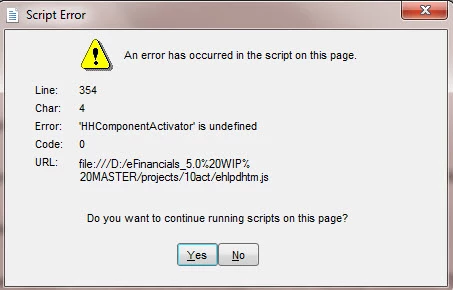
I am using RH10 and have the latest patches applied. On one project I am getting a script error message that is displayed when I try to view any topic from the WYSIWYG editor. If I create a new topic within the project I still get the message.

I don't get the message when I try from another project.

It looks like there is a problem with ehlpdhtm.js   ???

Any thoughts or ideas as to what to do to try and resolve this?.
This topic has been closed for replies.
Correct answer Peter Grainge

I get the same script error whenever I try doing a preview of the topic too; so I tried the Update DHTML thing you suggested & it had no effect.


The answer was to close Rh, delete the ehlpdhtm.js file and reopen Rh. That created a new js file that did not give the problem.


See www.grainge.org for RoboHelp and Authoring tips

@petergrainge

2 replies

Captiv8r
Legend
June 4, 2015

Hi there

Perhaps click Tools > Update DHTML Effects in Topics and see if that causes it to resolve.

Cheers... Rick

Jeff_Coatsworth
Community Expert
Community Expert
June 4, 2015

Sorry Rick – that has no effect on the warning

Captiv8r
Legend
June 4, 2015

Just curious. You know this because the OP reported it? Or how?

Cheers... Rick

Jeff_Coatsworth
Community Expert
Community Expert
June 4, 2015

That’s normal – it’s your browser freaking out at a local file’s JS trying to run – just ignore it & say Yes.